Templates · Settings screens · Social app · Carrier
Carrier Settings screen
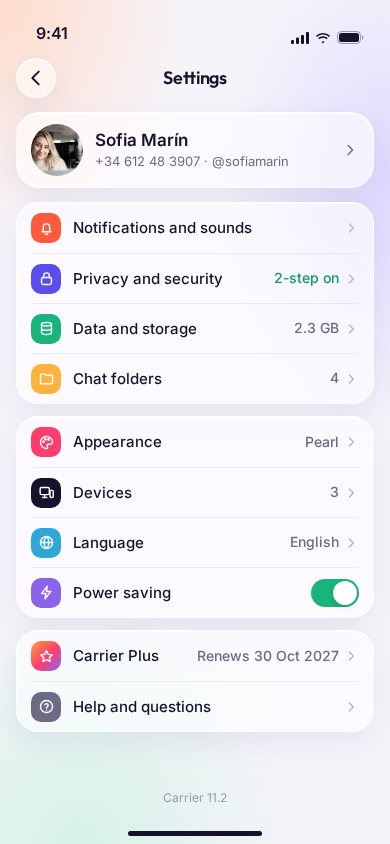
A settings screen from Carrier, a cloud messaging with channels app template in a Glass style. Screen 25 of 25.
Carrier is a complete cloud messenger: welcome, phone number and code, a chat list with folders and pinned chats, a conversation with photos, a voice note and a reply, a group with a poll, a contact profile, a photo viewer, channels you follow, a channel feed with views and reactions, channel info, discover and search, creating a channel, writing and scheduling a post, channel stats, calls with voice and video, cloud storage, the Plus plan with checkout, activity, your profile and settings. Pearl glass with persimmon, rose and ink.
| Detail | Value |
|---|---|
| Screen type | Settings |
| App | Carrier: Cloud messaging with channels |
| Category | Social |
| Design language | Glass, light |
| Type | Outfit for headings, Inter for text |
| Colours | #f6f4fa background, #ffffff surface, #15132b text, #6e6a86 text-muted, #ff5a3c accent, #ffffff accent-contrast, #5b4cf0 secondary, #e7e4f0 border, #ff3b5c danger |
What this screen says
- Settings
- Sofia Marín+34 612 48 3907 · @sofiamarin
- Notifications and sounds
- Privacy and security 2-step on
- Data and storage 2.3 GB
- Chat folders 4
- Appearance Pearl
- Devices 3
- Language English
- Power saving
- Carrier Plus Renews 30 Oct 2027
- Help and questions
- Carrier 11.2
Around it in Carrier
More settings screens
- Pledge Settings: Back creative projects
- Civic Settings: Report issues and city services
- Guild Settings: Community servers with voice and text chat
- Parrot Settings: Private messaging, groups and calls
- Vista Settings: Photos, stories and reels
- Flick Settings: Short video feed
- Squawk Settings: Short posts and live conversation
- Agora Settings: Communities, threads and votes
- Spark Settings: Swipe dating
- Candid Settings: One real photo a day
- Blink Settings: Camera chat and stories
- Cipher Privacy: Encrypted private messenger
Every social app settings screen
What makes a good settings screen
- Group options into clear sections. Account, notifications, privacy, appearance and help, with headings, so people scan to the right group.
- Label settings by their effect. "Daily reminder at 8:00" is clearer than "Reminders". Add a short description under options that need one.
- Use the right control. Toggles for on and off, a row that opens a list for choices, and sliders only for ranges.
- Apply changes immediately. Most mobile settings take effect when changed, with no Save button to forget.
The full settings screen guide and every example
Remix Carrier free: describe your own app and it is drawn in this design. Or get its files from $10: Figma, React Native, SwiftUI, Flutter and HTML.