Templates · Settings screens · Fitness app · Velo
Velo Settings screen
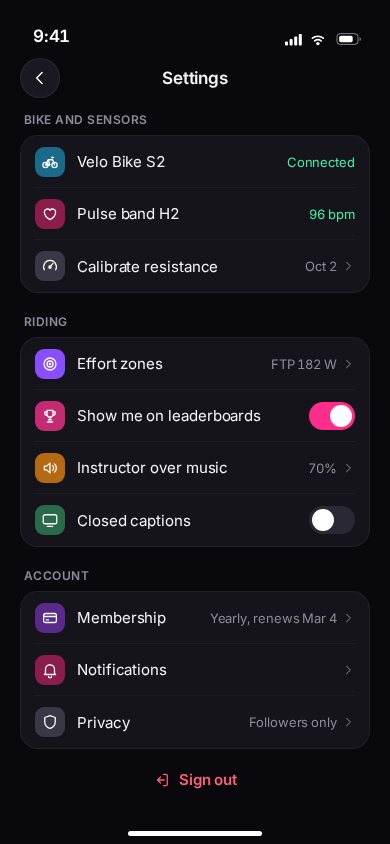
A settings screen from Velo, a live and on-demand indoor cycling app template in a Dark-first style. Screen 25 of 25.
Velo is a complete indoor cycling app: welcome, goals and sign in, a home with your streak, the next live ride and your stack, a class library with filters, class details with the playlist and effort profile, the live schedule, booking and a confirmation, a countdown, the ride itself with three live metrics and a leaderboard, a summary with an output graph, instructors, programs, a stack, progress, achievements, membership, notifications, profile and settings. Stage black with hot magenta, cyan and amber.
| Detail | Value |
|---|---|
| Screen type | Settings |
| App | Velo: Live and on-demand indoor cycling |
| Category | Health and fitness |
| Design language | Dark-first, dark |
| Type | Unbounded for headings, Inter for text |
| Colours | #09090d background, #15141b surface, #f5f3f8 text, #8e8b9b text-muted, #ff2d8a accent, #ffffff accent-contrast, #36e3ff secondary, #26242f border, #ffb23e warning |
What this screen says
- Settings
- BIKE AND SENSORS
- Velo Bike S2 Connected
- Pulse band H2 96 bpm
- Calibrate resistance Oct 2
- RIDING
- Effort zones FTP 182 W
- Show me on leaderboards
- Instructor over music 70%
- Closed captions
- ACCOUNT
- Membership Yearly, renews Mar 4
- Notifications
- Privacy Followers only
- Sign out
Around it in Velo
More settings screens
- Reformer Settings: Pilates studio booking
- Sip Settings: Water intake and hydration
- Mend Settings: Physio and rehab exercises
- Tabata Settings: HIIT interval timer
- Jab Settings: Boxing workouts with a smart bag
- Exhale Settings: Breathwork sessions
- Bump Settings: Pregnancy week by week
- Locker Settings: Gym membership and class booking
- Morsel Reminders: AI calorie tracker
- Dew Settings: AI skin scan and routine
- Cradle Settings: Baby tracker
- Donor Settings: Blood donation, counted drop by drop
Every fitness app settings screen
What makes a good settings screen
- Group options into clear sections. Account, notifications, privacy, appearance and help, with headings, so people scan to the right group.
- Label settings by their effect. "Daily reminder at 8:00" is clearer than "Reminders". Add a short description under options that need one.
- Use the right control. Toggles for on and off, a row that opens a list for choices, and sliders only for ranges.
- Apply changes immediately. Most mobile settings take effect when changed, with no Save button to forget.
The full settings screen guide and every example
Remix Velo free: describe your own app and it is drawn in this design. Or get its files from $10: Figma, React Native, SwiftUI, Flutter and HTML.