Templates · Settings screens · Fitness app · Bump
Bump Settings screen
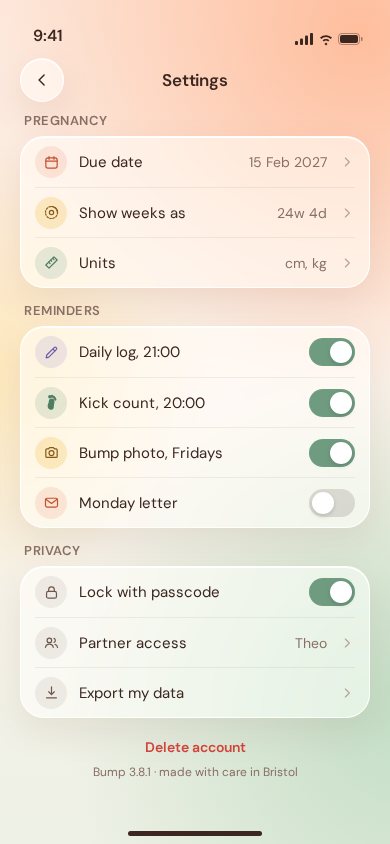
A settings screen from Bump, a pregnancy week by week app template in a Glass style. Screen 25 of 25.
Bump is a complete pregnancy companion: welcome, a due date calculator, account, a today screen with the week dial, this week's baby and body changes, all 40 weeks, an ultrasound scan viewer, a kick counter and a contraction timer, a daily symptom log, a bump photo diary with a ghost outline camera, weight and symptom trends, appointments with prep, antenatal classes with booking, checkout and confirmation, a shared baby name shortlist, a hospital bag checklist, notifications, a Plus plan, profile and settings. Apricot, cream and sage glass with terracotta and soft serif numbers.
| Detail | Value |
|---|---|
| Screen type | Settings |
| App | Bump: Pregnancy week by week |
| Category | Health and fitness |
| Design language | Glass, light |
| Type | Fraunces for headings, DM Sans for text |
| Colours | #fbf2ea background, #ffffff surface, #3b2620 text, #8a6f66 text-muted, #e0643f accent, #ffffff accent-contrast, #6f9c80 secondary, #f2c45a highlight, #ecdcd2 border, #d0443a danger |
What this screen says
- Settings
- PREGNANCY
- Due date 15 Feb 2027
- Show weeks as 24w 4d
- Units cm, kg
- REMINDERS
- Daily log, 21:00
- Kick count, 20:00
- Bump photo, Fridays
- Monday letter
- PRIVACY
- Lock with passcode
- Partner access Theo
- Export my data
- Delete account
- Bump 3.8.1 · made with care in Bristol
Around it in Bump
More settings screens
- Kilo Settings: Strength training log
- Cyra Reminders: Cycle tracker
- Harbor Settings: Therapy and mood
- Fasten Settings: Intermittent fasting
- Plate Settings: Calorie and macro tracker
- Vita Settings: Personal health record
- Forge Settings: AI fitness and nutrition
- Lull Settings: Sleep sounds and meditation
- Pace Settings: Fitness tracker
- Flexpass Settings: One membership, many studios
- Clinic Settings: Find and book doctors
- Careline Settings: Care for an ageing parent
Every fitness app settings screen
What makes a good settings screen
- Group options into clear sections. Account, notifications, privacy, appearance and help, with headings, so people scan to the right group.
- Label settings by their effect. "Daily reminder at 8:00" is clearer than "Reminders". Add a short description under options that need one.
- Use the right control. Toggles for on and off, a row that opens a list for choices, and sliders only for ranges.
- Apply changes immediately. Most mobile settings take effect when changed, with no Save button to forget.
The full settings screen guide and every example
Remix Bump free: describe your own app and it is drawn in this design. Or get its files from $10: Figma, React Native, SwiftUI, Flutter and HTML.