Templates · Settings screens · Fitness app · Reformer
Reformer Settings screen
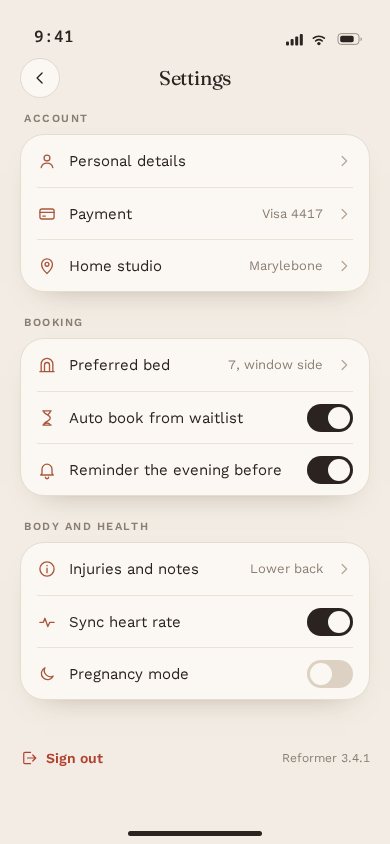
A settings screen from Reformer, a pilates studio booking app template in a Luxury style. Screen 25 of 25.
Reformer is a complete Pilates studio app: welcome, choosing your practice, sign in, a today screen with your next class in an arch, the weekly schedule, search, a class page with its spring settings, choosing your reformer on a drawn floor plan of the room, booking with pack credits, a confirmation, your bookings, a check in pass, a live in class screen with the carriage track, teachers, a studio page, progress, rating a class, on demand videos with a player, class packs, notifications, a private session form, profile and settings. Oat plaster, espresso and terracotta clay.
| Detail | Value |
|---|---|
| Screen type | Settings |
| App | Reformer: Pilates studio booking |
| Category | Health and fitness |
| Design language | Luxury, light |
| Type | Fraunces for headings, Work Sans for text |
| Colours | #f2ece4 background, #fbf8f3 surface, #2b2320 text, #8a7d72 text-muted, #a9573c accent, #fbf8f3 accent-contrast, #ead8ca secondary, #e3d9cd border, #b2412f danger |
What this screen says
- Settings
- Account
- Personal details
- Payment Visa 4417
- Home studio Marylebone
- Booking
- Preferred bed 7, window side
- Auto book from waitlist
- Reminder the evening before
- Body and health
- Injuries and notes Lower back
- Sync heart rate
- Pregnancy mode
- Sign outReformer 3.4.1
Around it in Reformer
More settings screens
- Harbor Settings: Therapy and mood
- Fasten Settings: Intermittent fasting
- Plate Settings: Calorie and macro tracker
- Vita Settings: Personal health record
- Forge Settings: AI fitness and nutrition
- Lull Settings: Sleep sounds and meditation
- Pace Settings: Fitness tracker
- Flexpass Settings: One membership, many studios
- Clinic Settings: Find and book doctors
- Careline Settings: Care for an ageing parent
- Velo Settings: Live and on-demand indoor cycling
- Vantage Device: Sports watch companion
Every fitness app settings screen
What makes a good settings screen
- Group options into clear sections. Account, notifications, privacy, appearance and help, with headings, so people scan to the right group.
- Label settings by their effect. "Daily reminder at 8:00" is clearer than "Reminders". Add a short description under options that need one.
- Use the right control. Toggles for on and off, a row that opens a list for choices, and sliders only for ranges.
- Apply changes immediately. Most mobile settings take effect when changed, with no Save button to forget.
The full settings screen guide and every example
Remix Reformer free: describe your own app and it is drawn in this design. Or get its files from $10: Figma, React Native, SwiftUI, Flutter and HTML.