Templates · Settings screens · Fitness app · Locker
Locker Settings screen
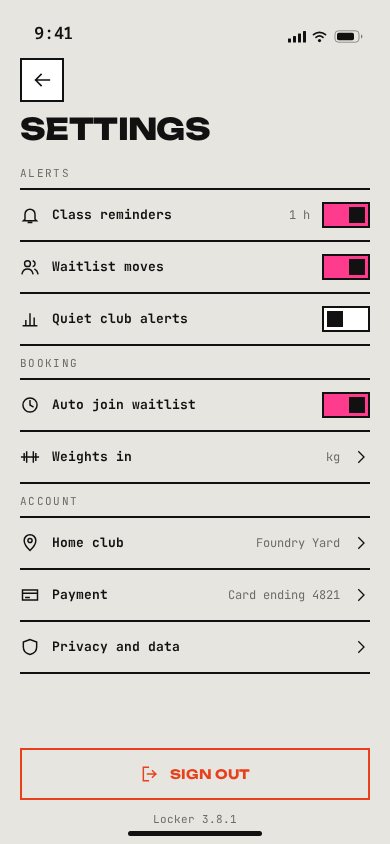
A settings screen from Locker, a gym membership and class booking app template in a Brutalist style. Screen 25 of 25.
Locker is a complete gym membership app: welcome, home club and sign in, a home with the next class on a locker door and live club busyness, a door pass with your locker number, the timetable, search, class details, a studio floor plan to pick a spot, booking and confirmation, bookings, a live class timer, busy times, stats, coaches, clubs and a club page, locker rental, guest passes, membership plans, notifications, profile and settings. Concrete grey, black and one hot pink.
| Detail | Value |
|---|---|
| Screen type | Settings |
| App | Locker: Gym membership and class booking |
| Category | Health and fitness |
| Design language | Brutalist, light |
| Type | Unbounded for headings, JetBrains Mono for text |
| Colours | #e6e5df background, #ffffff surface, #111111 text, #6d6c66 text-muted, #ff3b8d accent, #111111 accent-contrast, #c5cbcd secondary, #111111 border, #e8401c danger |
What this screen says
- Settings
- Alerts
- Class reminders
- 1 h
- Waitlist moves
- Quiet club alerts
- Booking
- Auto join waitlist
- Weights in
- kg
- Account
- Home club
- Foundry Yard
- Payment
- Card ending 4821
- Privacy and data
- Sign out
- Locker 3.8.1
Around it in Locker
More settings screens
- Donor Settings: Blood donation, counted drop by drop
- Unfold Settings: Yoga and stretching
- Kilo Settings: Strength training log
- Cyra Reminders: Cycle tracker
- Harbor Settings: Therapy and mood
- Fasten Settings: Intermittent fasting
- Plate Settings: Calorie and macro tracker
- Vita Settings: Personal health record
- Forge Settings: AI fitness and nutrition
- Lull Settings: Sleep sounds and meditation
- Pace Settings: Fitness tracker
- Flexpass Settings: One membership, many studios
Every fitness app settings screen
What makes a good settings screen
- Group options into clear sections. Account, notifications, privacy, appearance and help, with headings, so people scan to the right group.
- Label settings by their effect. "Daily reminder at 8:00" is clearer than "Reminders". Add a short description under options that need one.
- Use the right control. Toggles for on and off, a row that opens a list for choices, and sliders only for ranges.
- Apply changes immediately. Most mobile settings take effect when changed, with no Save button to forget.
The full settings screen guide and every example
Remix Locker free: describe your own app and it is drawn in this design. Or get its files from $10: Figma, React Native, SwiftUI, Flutter and HTML.