Templates · Booking and checkout screens · Productivity app · Uptime
Uptime Upgrade screen
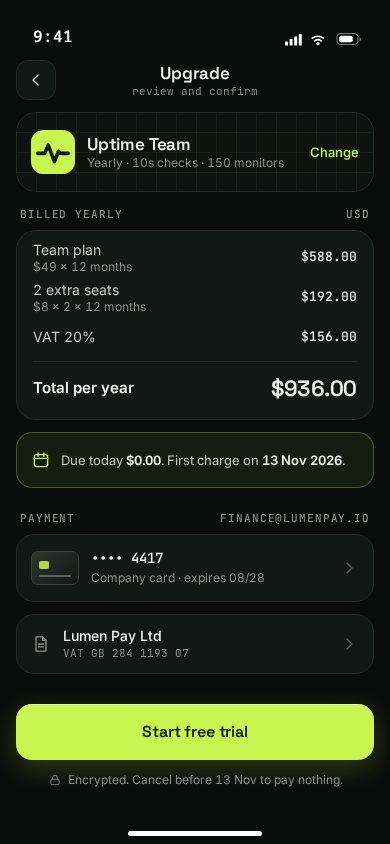
A checkout screen from Uptime, a server and site monitoring app template in a Dark-first style. Screen 23 of 25.
Uptime is a complete uptime and incident app: welcome, sign in and two factor, an overview with the live response trace and an active outage, monitors with heartbeat strips, a monitor with its response chart, a timing breakdown, a dotted world map of probe regions, a live check log, incidents with a timeline, posting an update and resolving it, a new monitor form, alert rules, the public status page, on call rotation, certificates, alert channels, SLA reports, notifications, a Team plan with checkout, profile and settings. Near black with phosphor lime, amber and coral.
| Detail | Value |
|---|---|
| Screen type | Checkout |
| App | Uptime: Server and site monitoring |
| Category | Productivity |
| Design language | Dark-first, dark |
| Type | Space Grotesk for headings, Inter for text |
| Colours | #0a0c0b background, #131715 surface, #edf2ee text, #87918a text-muted, #c8f550 accent, #0f1a00 accent-contrast, #ffb547 secondary, #242a26 border, #ff5d5d danger |
What this screen says
- Upgradereview and confirm
- Uptime TeamYearly · 10s checks · 150 monitors
- Change
- Billed yearly USD
- Team plan$49 × 12 months $588.00
- 2 extra seats$8 × 2 × 12 months $192.00
- VAT 20% $156.00
- Total per year $936.00
- Due today $0.00. First charge on 13 Nov 2026.
- Payment finance@lumenpay.io
- •••• 4417Company card · expires 08/28
- Lumen Pay LtdVAT GB 284 1193 07
- Start free trial
- Encrypted. Cancel before 13 Nov to pay nothing.
Around it in Uptime
More booking and checkout screens
- Replay Upgrade: Record and share screen videos
- Beam Checkout: Send big files
- Lectern Export: Slides and presenter remote
- Ringer Block number: Phone, contacts and voicemail
- Pipeline Quote: Sales CRM on the road
- Aim Close quarter: Goals and key results
- Scribe Checkout: Voice memos to notes
- Inkline Finish signing: Sign and send contracts
- Dispatch Invoice: Field service jobs for technicians
- Stash Checkout: Read-it-later and highlights
- Branch Export: Mind maps
- Bench Fund escrow: Freelance marketplace
Every productivity app checkout screen
What makes a good checkout screen
- Show the total early and honestly. Taxes, delivery and service fees should appear before the last step. A higher total on the final screen feels like a trick.
- Offer wallet payments. Apple Pay and Google Pay skip card typing entirely. Show them first when they are available.
- Ask for the minimum. Only the fields needed to deliver or book. Save details for next time.
- Let people review before paying. A clear summary of items, dates, address and price, with each part editable without starting over.
The full checkout screen guide and every example
Remix Uptime free: describe your own app and it is drawn in this design. Or get its files from $10: Figma, React Native, SwiftUI, Flutter and HTML.