Templates · Booking and checkout screens · Productivity app · Stash
Stash Checkout screen
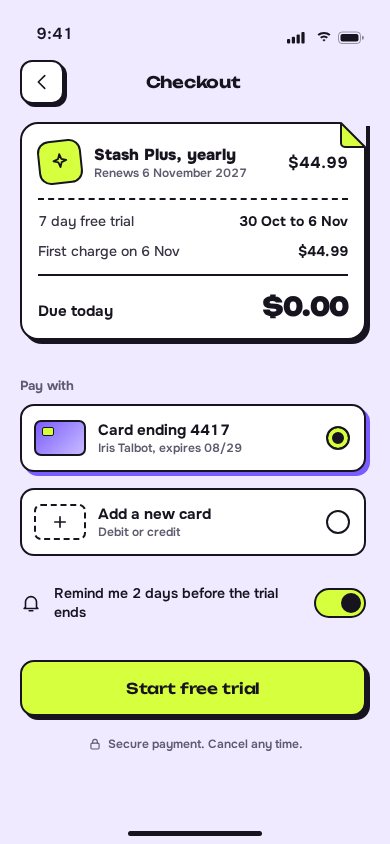
A checkout screen from Stash, a productivity app template in a Neubrutalism style. Screen 22 of 25.
Stash is a complete read-it-later app: welcome, interests and sign in, a home with the article you are halfway through and what is up next, a library with collections, full text search, a reader with highlights and notes, display settings, listening with a waveform player, a highlights feed, shareable quote cards, collections, saving a link with a stashed confirmation, a daily review of old highlights, reading stats, a newsletter inbox, a publication page, a Plus plan with checkout, notifications, profile and settings. Lilac paper, ink borders and hard shadows, with lime highlighter kept for what you saved, what is selected and the main action.
| Detail | Value |
|---|---|
| Screen type | Checkout |
| App | Stash: Read-it-later and highlights |
| Category | Productivity |
| Design language | Neubrutalism, light |
| Type | Unbounded for headings, Onest for text |
| Colours | #efeaff background, #ffffff surface, #17141f text, #5f5a6e text-muted, #d6ff3d accent, #17141f accent-contrast, #7a5cff secondary, #17141f border, #ff5a4e danger |
What this screen says
- Checkout
- Stash Plus, yearlyRenews 6 November 2027
- 7 day free trial30 Oct to 6 Nov
- First charge on 6 Nov$44.99
- Due today$0.00
- Pay with
- Card ending 4417Iris Talbot, expires 08/29
- Add a new cardDebit or credit
- Remind me 2 days before the trial ends
- Start free trial
- Secure payment. Cancel any time.
Around it in Stash
More booking and checkout screens
- Chrono Send invite: World clock, timers and stopwatch
- Frontdesk Refund: Customer support inbox
- Campaign Schedule: Email marketing campaigns
- Outpost Schedule: Schedule social posts
- Polish Checkout: Writing assistant and keyboard
- Tapline Send a tip: Link-in-bio pages and analytics
- Quill Checkout: Docs, wikis and databases in one workspace
- Tandem Review plan: Team chat, channels and huddles
- Shipyard Upgrade: Issue tracking for product teams
- Canvas Checkout: Design files and comments on mobile
- Merge: Code, pull requests and reviews
- Query Checkout: AI answers with sources
Every productivity app checkout screen
What makes a good checkout screen
- Show the total early and honestly. Taxes, delivery and service fees should appear before the last step. A higher total on the final screen feels like a trick.
- Offer wallet payments. Apple Pay and Google Pay skip card typing entirely. Show them first when they are available.
- Ask for the minimum. Only the fields needed to deliver or book. Save details for next time.
- Let people review before paying. A clear summary of items, dates, address and price, with each part editable without starting over.
The full checkout screen guide and every example
Remix Stash free: describe your own app and it is drawn in this design. Or get its files from $10: Figma, React Native, SwiftUI, Flutter and HTML.