Templates · Settings screens · Productivity app · Uptime
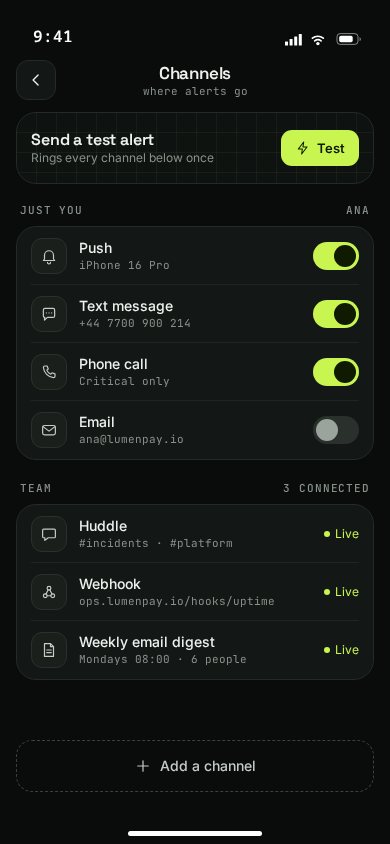
Uptime Channels screen
A settings screen from Uptime, a server and site monitoring app template in a Dark-first style. Screen 19 of 25.
Uptime is a complete uptime and incident app: welcome, sign in and two factor, an overview with the live response trace and an active outage, monitors with heartbeat strips, a monitor with its response chart, a timing breakdown, a dotted world map of probe regions, a live check log, incidents with a timeline, posting an update and resolving it, a new monitor form, alert rules, the public status page, on call rotation, certificates, alert channels, SLA reports, notifications, a Team plan with checkout, profile and settings. Near black with phosphor lime, amber and coral.
| Detail | Value |
|---|---|
| Screen type | Settings |
| App | Uptime: Server and site monitoring |
| Category | Productivity |
| Design language | Dark-first, dark |
| Type | Space Grotesk for headings, Inter for text |
| Colours | #0a0c0b background, #131715 surface, #edf2ee text, #87918a text-muted, #c8f550 accent, #0f1a00 accent-contrast, #ffb547 secondary, #242a26 border, #ff5d5d danger |
What this screen says
- Channelswhere alerts go
- Send a test alertRings every channel below once
- Test
- Just you Ana
- PushiPhone 16 Pro
- Text message+44 7700 900 214
- Phone callCritical only
- Emailana@lumenpay.io
- Team 3 connected
- Huddle#incidents · #platform
- Live
- Webhookops.lumenpay.io/hooks/uptime
- Weekly email digestMondays 08:00 · 6 people
- Add a channel
Around it in Uptime
More settings screens
- Tandem Settings: Team chat, channels and huddles
- Shipyard Settings: Issue tracking for product teams
- Canvas Settings: Design files and comments on mobile
- Merge Settings: Code, pull requests and reviews
- Query Settings: AI answers with sources
- Glossa Settings: Translate text, voice and camera
- Layout Settings: Design anything from templates
- Tick Settings: To-do lists and reminders
- Beacon Left behind: Find your devices and people
- Staffroom Settings: HR, payslips and time off
- Slot Settings: Booking links and meeting scheduling
- Sheet Settings: Spreadsheets and databases
Every productivity app settings screen
What makes a good settings screen
- Group options into clear sections. Account, notifications, privacy, appearance and help, with headings, so people scan to the right group.
- Label settings by their effect. "Daily reminder at 8:00" is clearer than "Reminders". Add a short description under options that need one.
- Use the right control. Toggles for on and off, a row that opens a list for choices, and sliders only for ranges.
- Apply changes immediately. Most mobile settings take effect when changed, with no Save button to forget.
The full settings screen guide and every example
Remix Uptime free: describe your own app and it is drawn in this design. Or get its files from $10: Figma, React Native, SwiftUI, Flutter and HTML.