Templates · Settings screens · Productivity app · Shipyard
Shipyard Settings screen
A settings screen from Shipyard, an issue tracking for product teams app template in a Dark-first style. Screen 25 of 25.
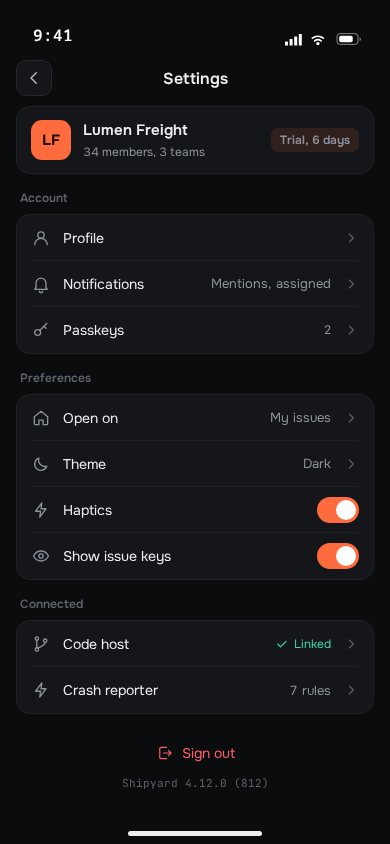
Shipyard is a complete issue tracker for product teams: welcome, sign in and joining a workspace, a home with your issues and the running cycle, an inbox, team issues as a grouped list and a board, an issue with properties, sub-issues and a comment thread, a quick new issue sheet with a status picker, search and filters, a cycle burn-up with a closing summary, projects, a project page, a roadmap timeline, insights, a triage queue, a screenshot attachment viewer, plans with a seat checkout, a teammate profile and settings. Graphite and charcoal with buoy orange and seafoam.
| Detail | Value |
|---|---|
| Screen type | Settings |
| App | Shipyard: Issue tracking for product teams |
| Category | Productivity |
| Design language | Dark-first, dark |
| Type | JetBrains Mono for headings, Onest for text |
| Colours | #0b0c0e background, #141619 surface, #eceef0 text, #8b929b text-muted, #ff6b3d accent, #1a0a03 accent-contrast, #3ad6b0 secondary, #24282d border, #ff5f6d danger |
What this screen says
- Settings
- LF
- Lumen Freight
- 34 members, 3 teams
- Trial, 6 days
- Account
- Profile
- Notifications
- Mentions, assigned
- Passkeys
- Preferences
- Open on
- My issues
- Theme
- Dark
- Haptics
- Show issue keys
- Connected
- Code host
- Linked
- Crash reporter
- 7 rules
- Sign out
- Shipyard 4.12.0 (812)
Around it in Shipyard
More settings screens
- Layout Settings: Design anything from templates
- Tick Settings: To-do lists and reminders
- Beacon Left behind: Find your devices and people
- Staffroom Settings: HR, payslips and time off
- Slot Settings: Booking links and meeting scheduling
- Sheet Settings: Spreadsheets and databases
- Tunnel Protocol: VPN and online privacy
- Ping Settings: Internet speed test
- Glance Settings: Visual search with the camera
- Replay Settings: Record and share screen videos
- Easel Settings: Collaborative whiteboard
- Token Backups: Two-factor codes and sign-in approvals
Every productivity app settings screen
What makes a good settings screen
- Group options into clear sections. Account, notifications, privacy, appearance and help, with headings, so people scan to the right group.
- Label settings by their effect. "Daily reminder at 8:00" is clearer than "Reminders". Add a short description under options that need one.
- Use the right control. Toggles for on and off, a row that opens a list for choices, and sliders only for ranges.
- Apply changes immediately. Most mobile settings take effect when changed, with no Save button to forget.
The full settings screen guide and every example
Remix Shipyard free: describe your own app and it is drawn in this design. Or get its files from $10: Figma, React Native, SwiftUI, Flutter and HTML.