Templates · Paywall screens · Education app · Tuckin
Tuckin Plus screen
A paywall screen from Tuckin, a bedtime stories for kids app template in a Playful style. Screen 24 of 25.
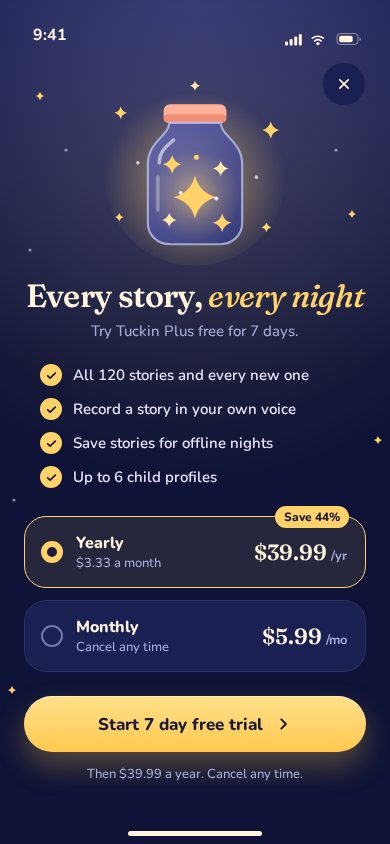
Tuckin is a complete bedtime story app: welcome, sign in, adding a child and a bedtime, picking who is listening, a home with tonight's story, a library, search and collections, a story page, an illustrated reader, a narration player with a sleep timer, sleep sounds, a goodnight screen, favourites, a bedtime diary, child and family profiles, a parent gate, parent controls, a Plus plan and settings. Everything a child can tap is star yellow; everything for parents is calm and plain.
| Detail | Value |
|---|---|
| Screen type | Paywall |
| App | Tuckin: Bedtime stories for kids |
| Category | Education |
| Design language | Playful, dark |
| Type | Nunito |
| Colours | #0e1337 background, #1a2152 surface, #fff4dc text, #a6add8 text-muted, #ffd36a accent, #1c1a3f accent-contrast, #ffb199 secondary, #2b3370 border, #ff8a94 danger |
What this screen says
- Every story, every night
- Try Tuckin Plus free for 7 days.
- All 120 stories and every new one
- Record a story in your own voice
- Save stories for offline nights
- Up to 6 child profiles
- Yearly
- $3.33 a month
- $39.99 /yrSave 44%
- Monthly
- Cancel any time
- $5.99 /mo
- Start 7 day free trial
- Then $39.99 a year. Cancel any time.
Around it in Tuckin
More paywall screens
- Chalk Plus: Design courses
- Encore Subscriptions: Creator courses
- Classroom Plus: Class stream and assignments
- Studyhall Support: Free lessons and practice for school
- Tutor Lesson plans: Book online tutors for any skill
- Leaf Unlimited: E-books and reading
- Almanac Support: The free encyclopedia reader
- Tiles Plus: Daily word and number puzzles
- Stacks Friends: Borrow e-books and audiobooks from your library
- Penpal Plus: Language exchange chat
- Lexis Patron: A word a day
- Quanta Plus: Interactive physics lessons
Every education app paywall screen
What makes a good paywall screen
- Lead with the outcome, not the feature list. The headline should say what changes for the person: "Train smarter every week" beats "Unlock Premium". Three to five benefits underneath are enough; more turns into a wall of ticks nobody reads.
- Show the real price, period and trial terms. State the price, how often it renews and when a free trial turns into a charge, near the button. Apple's App Store guideline 3.1.2 asks subscription apps to make this clear before purchase, and Google Play has similar rules.
- One primary button. The main call to action should be impossible to miss and say what happens: "Start 7-day free trial" or "Subscribe for $4.99/month". A second plan choice is fine; a second competing button is not.
- Make the plans easy to compare. When you offer monthly and yearly, show both prices in the same unit (per month or per week) and mark the saving on the yearly plan in plain numbers, not just a badge.
The full paywall screen guide and every example
Remix Tuckin free: describe your own app and it is drawn in this design. Or get its files from $10: Figma, React Native, SwiftUI, Flutter and HTML.