Templates · Paywall screens · Education app · Almanac
Almanac Support screen
A paywall screen from Almanac, an education app template in a Minimal style. Screen 20 of 25.
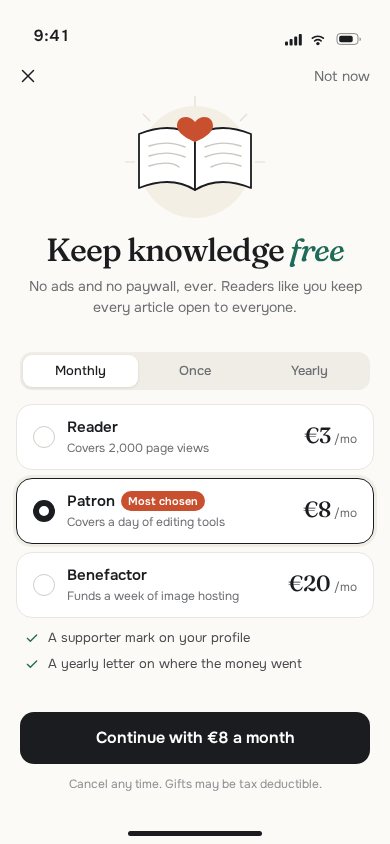
Almanac is a complete encyclopedia reader: welcome, sign in, an explore feed with the featured article, trending reads, on this day and the picture of the day, a full article with contents, quick facts and link previews, search with suggestions and results, saved reading lists, a map of articles nearby, page history, talk threads, section editing, the same article in 74 languages, reading stats, and a supporter plan with a donation, receipt, notifications, profile and settings. Paper white and ink, with viridian links and one vermilion accent.
| Detail | Value |
|---|---|
| Screen type | Paywall |
| App | Almanac: The free encyclopedia reader |
| Category | Education |
| Design language | Minimal, light |
| Type | Fraunces for headings, Onest for text |
| Colours | #fbfaf6 background, #ffffff surface, #1a1c1f text, #6c6e72 text-muted, #1d6b58 accent, #e3efe9 accent-tint, #c8502f secondary, #f3efe5 parchment, #e8e6df border |
What this screen says
- Not now
- Keep knowledge free
- No ads and no paywall, ever. Readers like you keep every article open to everyone.
- Monthly Once Yearly
- ReaderCovers 2,000 page views
- €3 /mo
- PatronMost chosenCovers a day of editing tools
- €8 /mo
- BenefactorFunds a week of image hosting
- €20 /mo
- A supporter mark on your profile
- A yearly letter on where the money went
- Continue with €8 a month
- Cancel any time. Gifts may be tax deductible.
Around it in Almanac
More paywall screens
- Encore Subscriptions: Creator courses
- Classroom Plus: Class stream and assignments
- Studyhall Support: Free lessons and practice for school
- Tutor Lesson plans: Book online tutors for any skill
- Leaf Unlimited: E-books and reading
- Tiles Plus: Daily word and number puzzles
- Stacks Friends: Borrow e-books and audiobooks from your library
- Penpal Plus: Language exchange chat
- Lexis Patron: A word a day
- Quanta Plus: Interactive physics lessons
- Cram Plus: Exam prep and mock tests
- Quad Meal plans: University campus app
Every education app paywall screen
What makes a good paywall screen
- Lead with the outcome, not the feature list. The headline should say what changes for the person: "Train smarter every week" beats "Unlock Premium". Three to five benefits underneath are enough; more turns into a wall of ticks nobody reads.
- Show the real price, period and trial terms. State the price, how often it renews and when a free trial turns into a charge, near the button. Apple's App Store guideline 3.1.2 asks subscription apps to make this clear before purchase, and Google Play has similar rules.
- One primary button. The main call to action should be impossible to miss and say what happens: "Start 7-day free trial" or "Subscribe for $4.99/month". A second plan choice is fine; a second competing button is not.
- Make the plans easy to compare. When you offer monthly and yearly, show both prices in the same unit (per month or per week) and mark the saving on the yearly plan in plain numbers, not just a badge.
The full paywall screen guide and every example
Remix Almanac free: describe your own app and it is drawn in this design. Or get its files from $10: Figma, React Native, SwiftUI, Flutter and HTML.