Templates · Paywall screens · Education app · Stacks
Stacks Friends screen
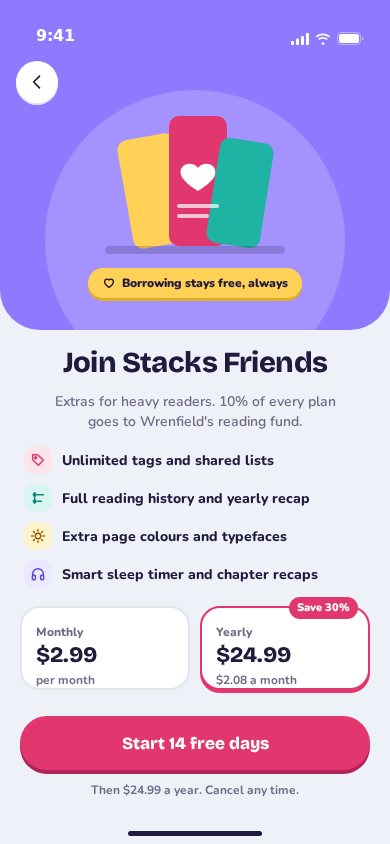
A paywall screen from Stacks, an education app template in a Playful style. Screen 23 of 25.
Stacks is a complete library lending app: welcome, finding your library and adding a library card, a home with the book you are reading and a hold that is ready, browsing the collection, search with availability, a title page with copies, borrowing with a lending period and a success screen, placing a hold with an estimated wait and your place in line, loans with renew and return, holds, a reader with highlights and reading options, an audiobook player, tags, a timeline, a reading year dashboard, notifications, a supporter plan, profile with library cards and settings. Cool cloud white with raspberry, teal and butter.
| Detail | Value |
|---|---|
| Screen type | Paywall |
| App | Stacks: Borrow e-books and audiobooks from your library |
| Category | Education |
| Design language | Playful, light |
| Type | Bricolage Grotesque for headings, Nunito for text |
| Colours | #eef1f8 background, #ffffff surface, #221a3d text, #6f6a86 text-muted, #e2366f accent, #ffffff accent-contrast, #1fb3a3 secondary, #e2e4ef border, #ffd257 warning |
What this screen says
- Borrowing stays free, always
- Join Stacks Friends
- Extras for heavy readers. 10% of every plan goes to Wrenfield's reading fund.
- Unlimited tags and shared lists
- Full reading history and yearly recap
- Extra page colours and typefaces
- Smart sleep timer and chapter recaps
- Monthly$2.99per month
- Save 30%Yearly$24.99$2.08 a month
- Start 14 free days
- Then $24.99 a year. Cancel any time.
Around it in Stacks
More paywall screens
- Wren Plus: Early reading for kids
- Proof Plus: Maths tutor that shows its working
- Skim Pro: Speed reading trainer
- Terra Plus: Geography and flags quiz
- Gambit Pro: Chess training
- Buzzer Plus: Live trivia
- Homeroom Plus: School, all on one page
- Parla Plus: Language learning
- Recall Plus: Flashcards and spaced repetition
- Numo Family: Kids maths game
- Syntax Pro: Learn to code
- Tuckin Plus: Bedtime stories for kids
Every education app paywall screen
What makes a good paywall screen
- Lead with the outcome, not the feature list. The headline should say what changes for the person: "Train smarter every week" beats "Unlock Premium". Three to five benefits underneath are enough; more turns into a wall of ticks nobody reads.
- Show the real price, period and trial terms. State the price, how often it renews and when a free trial turns into a charge, near the button. Apple's App Store guideline 3.1.2 asks subscription apps to make this clear before purchase, and Google Play has similar rules.
- One primary button. The main call to action should be impossible to miss and say what happens: "Start 7-day free trial" or "Subscribe for $4.99/month". A second plan choice is fine; a second competing button is not.
- Make the plans easy to compare. When you offer monthly and yearly, show both prices in the same unit (per month or per week) and mark the saving on the yearly plan in plain numbers, not just a badge.
The full paywall screen guide and every example
Remix Stacks free: describe your own app and it is drawn in this design. Or get its files from $10: Figma, React Native, SwiftUI, Flutter and HTML.