Templates · Search and explore screens · Productivity app · Tandem
Tandem Browse channels screen
A search screen from Tandem, a productivity app template in an Enterprise style. Screen 14 of 25.
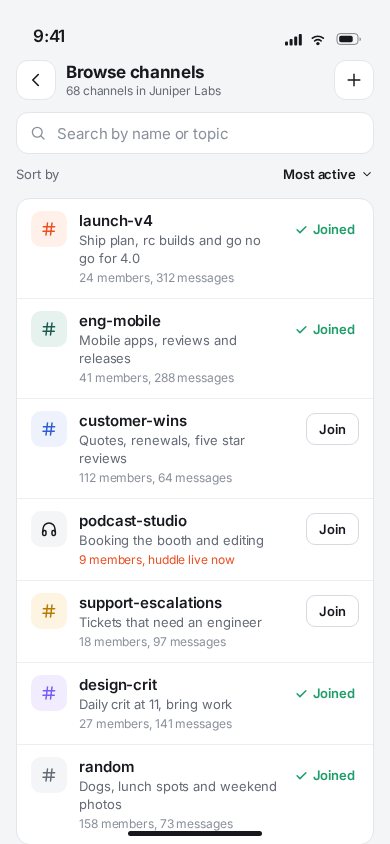
Tandem is a complete team chat app: welcome, sign in with an emailed code, a workspace picker, a home with unread channels, a live huddle and direct messages, a channel with reactions and threads, a thread, a composer with mentions and formatting, direct messages, a live huddle with a shared screen, activity, search, browsing and creating channels, channel details, files, saved for later, setting a status, workspace analytics, a Pro plan with a seat based checkout, profile and notification settings. Cool grey and white with ink and persimmon.
| Detail | Value |
|---|---|
| Screen type | Search |
| App | Tandem: Team chat, channels and huddles |
| Category | Productivity |
| Design language | Enterprise, light |
| Type | Space Grotesk for headings, Inter for text |
| Colours | #f4f5f7 background, #ffffff surface, #16181d text, #646a76 text-muted, #ea4f22 accent, #ffffff accent-contrast, #16181d secondary, #e3e5ea border, #d93a3a danger, #1f9d6a success |
What this screen says
- Browse channels68 channels in Juniper Labs
- Search by name or topic
- Sort by Most active
- launch-v4
- Ship plan, rc builds and go no go for 4.0
- 24 members, 312 messages
- Joined
- eng-mobile
- Mobile apps, reviews and releases
- 41 members, 288 messages
- customer-wins
- Quotes, renewals, five star reviews
- 112 members, 64 messages
- Join
- podcast-studio
- Booking the booth and editing
- 9 members, huddle live now
- support-escalations
- Tickets that need an engineer
- 18 members, 97 messages
- design-crit
- Daily crit at 11, bring work
- 27 members, 141 messages
- random
- Dogs, lunch spots and weekend photos
- 158 members, 73 messages
Around it in Tandem
More search and explore screens
- Pageview Search: Website analytics
- Quill Search: Docs, wikis and databases in one workspace
- Shipyard Search: Issue tracking for product teams
- Canvas Search: Design files and comments on mobile
- Merge Search: Code, pull requests and reviews
- Query Ask: AI answers with sources
- Glossa Choose language: Translate text, voice and camera
- Layout Templates: Design anything from templates
- Tick Browse: To-do lists and reminders
- Beacon Search: Find your devices and people
- Staffroom Directory: HR, payslips and time off
- Slot Search: Booking links and meeting scheduling
Every productivity app search screen
What makes a good search screen
- Show something before people type. Recent searches, popular items or categories make the empty search screen useful and save typing.
- Suggest as people type. Autocomplete with matching items, not only matching words, lets people jump straight to a result.
- Make filters visible and reversible. Show active filters as chips that can be removed in one tap, and the number of results as filters change.
- Forgive typos. Close matches and "Did you mean" stop a spelling mistake from ending in an empty screen.
The full search screen guide and every example
Remix Tandem free: describe your own app and it is drawn in this design. Or get its files from $10: Figma, React Native, SwiftUI, Flutter and HTML.