Templates · Search and explore screens · Productivity app · Shipyard
Shipyard Search screen
A search screen from Shipyard, an issue tracking for product teams app template in a Dark-first style. Screen 12 of 25.
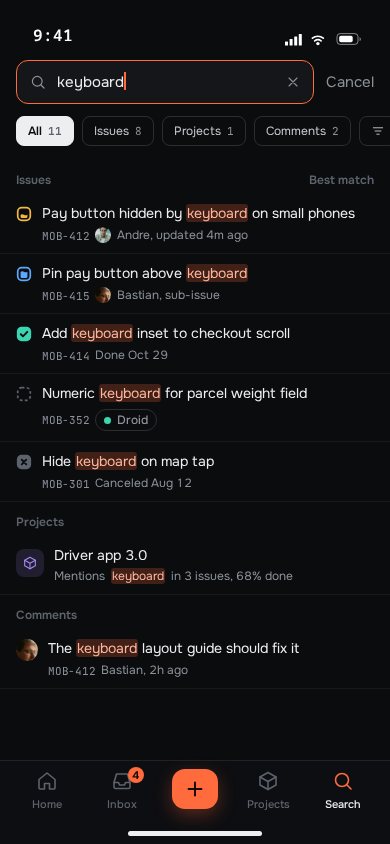
Shipyard is a complete issue tracker for product teams: welcome, sign in and joining a workspace, a home with your issues and the running cycle, an inbox, team issues as a grouped list and a board, an issue with properties, sub-issues and a comment thread, a quick new issue sheet with a status picker, search and filters, a cycle burn-up with a closing summary, projects, a project page, a roadmap timeline, insights, a triage queue, a screenshot attachment viewer, plans with a seat checkout, a teammate profile and settings. Graphite and charcoal with buoy orange and seafoam.
| Detail | Value |
|---|---|
| Screen type | Search |
| App | Shipyard: Issue tracking for product teams |
| Category | Productivity |
| Design language | Dark-first, dark |
| Type | JetBrains Mono for headings, Onest for text |
| Colours | #0b0c0e background, #141619 surface, #eceef0 text, #8b929b text-muted, #ff6b3d accent, #1a0a03 accent-contrast, #3ad6b0 secondary, #24282d border, #ff5f6d danger |
What this screen says
- keyboard
- Cancel
- All11 Issues8 Projects1 Comments2
- Issues Best match
- Pay button hidden by keyboard on small phones
- MOB-412
- Andre, updated 4m ago
- Pin pay button above keyboard
- MOB-415
- Bastian, sub-issue
- Add keyboard inset to checkout scroll
- MOB-414 Done Oct 29
- Numeric keyboard for parcel weight field
- MOB-352 Droid
- Hide keyboard on map tap
- MOB-301 Canceled Aug 12
- Projects
- Driver app 3.0
- Mentions keyboard in 3 issues, 68% done
- Comments
- The keyboard layout guide should fix it
- MOB-412 Bastian, 2h ago
- Home
- Inbox4
- Search
Around it in Shipyard
More search and explore screens
- Beam Search: Send big files
- Parchment Search: Documents, edit and share
- Lectern Search: Slides and presenter remote
- Ringer Search: Phone, contacts and voicemail
- Pipeline Search: Sales CRM on the road
- Aim Search: Goals and key results
- Scribe Search: Voice memos to notes
- Inkline Search: Sign and send contracts
- Dispatch Search: Field service jobs for technicians
- Stash Search: Read-it-later and highlights
- Branch Search: Mind maps
- Stow Search: Cloud storage
Every productivity app search screen
What makes a good search screen
- Show something before people type. Recent searches, popular items or categories make the empty search screen useful and save typing.
- Suggest as people type. Autocomplete with matching items, not only matching words, lets people jump straight to a result.
- Make filters visible and reversible. Show active filters as chips that can be removed in one tap, and the number of results as filters change.
- Forgive typos. Close matches and "Did you mean" stop a spelling mistake from ending in an empty screen.
The full search screen guide and every example
Remix Shipyard free: describe your own app and it is drawn in this design. Or get its files from $10: Figma, React Native, SwiftUI, Flutter and HTML.