Templates · Search and explore screens · Productivity app · Merge
Merge Search screen
A search screen from Merge, a productivity app template in a Dark-first style. Screen 6 of 25.
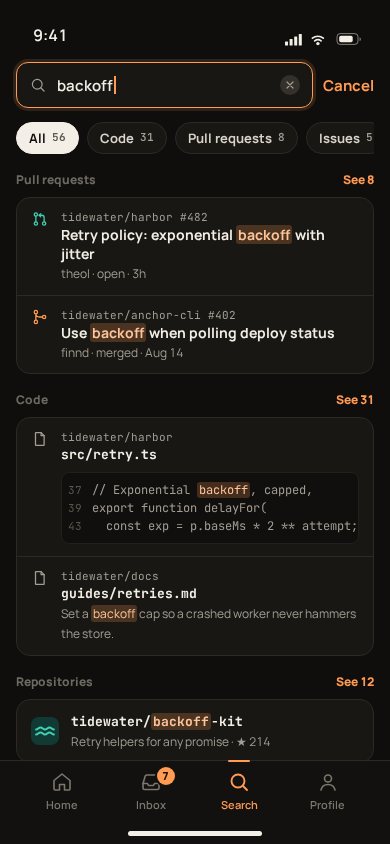
Merge is a complete code review app for your phone: welcome, sign in and two-step verification, a home with your work and reviews waiting, an inbox, search across repositories, pull requests and code, a repository with its files, a code viewer and commits, pull requests with a conversation timeline, a diff with inline comments, submitting a review, live checks with a streaming log, a merge confirmation and the merged state, issues with a detail and a new issue form, repository insights, a release, a Pro plan, profile and settings. Espresso black and charcoal with apricot, teal and rose.
| Detail | Value |
|---|---|
| Screen type | Search |
| App | Merge: Code, pull requests and reviews |
| Category | Productivity |
| Design language | Dark-first, dark |
| Type | JetBrains Mono for headings, Manrope for text |
| Colours | #0f0e0c background, #181714 surface, #f4efe6 text, #a39d92 text-muted, #ff9b52 accent, #1d1006 accent-contrast, #3fd0b4 secondary, #2c2a25 border, #ff6680 danger |
What this screen says
- backoff
- Cancel
- All 56 Code 31 Pull requests 8 Issues 5
- Pull requestsSee 8
- tidewater/harbor #482
- Retry policy: exponential backoff with jitter
- theol · open · 3h
- tidewater/anchor-cli #402
- Use backoff when polling deploy status
- finnd · merged · Aug 14
- CodeSee 31
- tidewater/harbor
- src/retry.ts
- 37// Exponential backoff, capped,
- 39export function delayFor (
- 43 const exp = p.baseMs * 2 ** attempt;
- tidewater/docs
- guides/retries.md
- Set a backoff cap so a crashed worker never hammers the store.
- RepositoriesSee 12
- tidewater/backoff-kit
- Retry helpers for any promise · ★ 214
- Home
- Inbox 7
- Search
- Profile
Around it in Merge
More search and explore screens
- Glance Results: Visual search with the camera
- Replay Search: Record and share screen videos
- Easel Search: Collaborative whiteboard
- Token Search: Two-factor codes and sign-in approvals
- Beam Search: Send big files
- Parchment Search: Documents, edit and share
- Lectern Search: Slides and presenter remote
- Ringer Search: Phone, contacts and voicemail
- Pipeline Search: Sales CRM on the road
- Aim Search: Goals and key results
- Scribe Search: Voice memos to notes
- Inkline Search: Sign and send contracts
Every productivity app search screen
What makes a good search screen
- Show something before people type. Recent searches, popular items or categories make the empty search screen useful and save typing.
- Suggest as people type. Autocomplete with matching items, not only matching words, lets people jump straight to a result.
- Make filters visible and reversible. Show active filters as chips that can be removed in one tap, and the number of results as filters change.
- Forgive typos. Close matches and "Did you mean" stop a spelling mistake from ending in an empty screen.
The full search screen guide and every example
Remix Merge free: describe your own app and it is drawn in this design. Or get its files from $10: Figma, React Native, SwiftUI, Flutter and HTML.