Templates · Search and explore screens · Smart home app · Tagged
Tagged Search screen
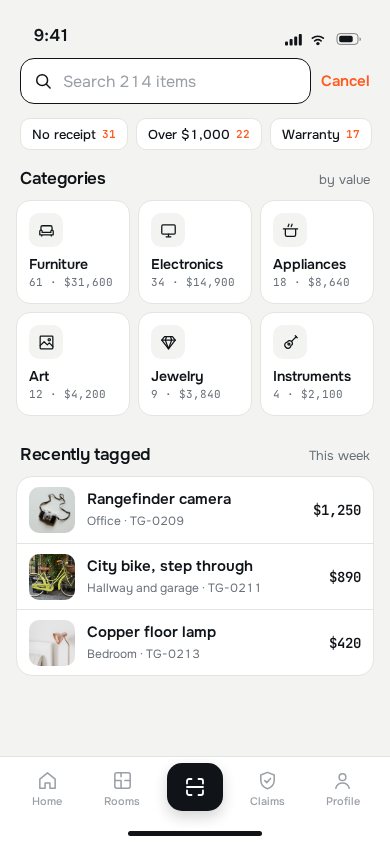
A search screen from Tagged, a home inventory for insurance app template in a Clinical style. Screen 11 of 25.
Tagged is a complete home inventory for insurance: welcome, sign in, policy limits, a home with insured value against the contents limit, rooms on a floor plan, a room and an item with its receipt, serial and proof checklist, a camera room scan, new item review, receipt reading, search, valuables over their sublimits, coverage and value history, a full water damage claim from incident to items, review, sent and live status with the adjuster, an insurer report export, warranties, notifications, a Plus plan, profile and settings. Paper grey and white with ink and signal orange.
| Detail | Value |
|---|---|
| Screen type | Search |
| App | Tagged: Home inventory for insurance |
| Category | Smart home |
| Design language | Clinical, light |
| Type | Onest |
| Colours | #f3f4f1 background, #ffffff surface, #101418 text, #6a717a text-muted, #ff5b1f accent, #ffffff accent-contrast, #12a66a secondary, #e3e5e0 border, #e5342b danger |
What this screen says
- Search 214 items
- Cancel
- No receipt31
- Over $1,00022
- Warranty17
- Categories
- by value
- Furniture61 · $31,600
- Electronics34 · $14,900
- Appliances18 · $8,640
- Art12 · $4,200
- Jewelry9 · $3,840
- Instruments4 · $2,100
- Recently tagged
- This week
- Rangefinder camera
- Office · TG-0209
- City bike, step through
- Hallway and garage · TG-0211
- Copper floor lamp
- Bedroom · TG-0213
- Home
- Rooms
- Claims
- Profile
Around it in Tagged
More search and explore screens
- Porch Search: Home security cameras
- Sundial Find a pro: Solar panels and home battery
- Puddle Plant library: Garden watering and sprinklers
- Upkeep Home plan: Home maintenance calendar
- Glow Scenes: Light scenes and colour
- Lobby Amenities: Apartment building app
- Dusk Add device: Smart home scenarios
- Abode Add device: Smart home devices
- Boxed Add item: Book movers and plan moving day
- Meter Help: Your energy supplier account
- Couch Search: TV remote, casting and watchlist
- Chime Skills: Voice assistant and smart speaker
Every smart home app search screen
What makes a good search screen
- Show something before people type. Recent searches, popular items or categories make the empty search screen useful and save typing.
- Suggest as people type. Autocomplete with matching items, not only matching words, lets people jump straight to a result.
- Make filters visible and reversible. Show active filters as chips that can be removed in one tap, and the number of results as filters change.
- Forgive typos. Close matches and "Did you mean" stop a spelling mistake from ending in an empty screen.
The full search screen guide and every example
Remix Tagged free: describe your own app and it is drawn in this design. Or get its files from $10: Figma, React Native, SwiftUI, Flutter and HTML.