Templates · Detail screens · Smart home app · Tagged
Tagged Receipt screen
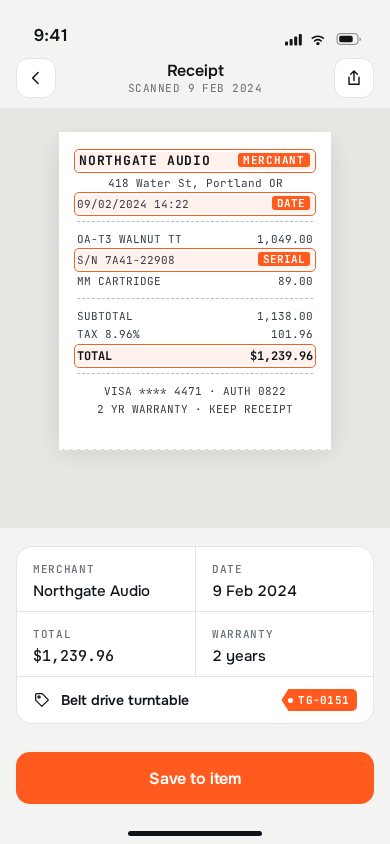
A detail screen from Tagged, a home inventory for insurance app template in a Clinical style. Screen 10 of 25.
Tagged is a complete home inventory for insurance: welcome, sign in, policy limits, a home with insured value against the contents limit, rooms on a floor plan, a room and an item with its receipt, serial and proof checklist, a camera room scan, new item review, receipt reading, search, valuables over their sublimits, coverage and value history, a full water damage claim from incident to items, review, sent and live status with the adjuster, an insurer report export, warranties, notifications, a Plus plan, profile and settings. Paper grey and white with ink and signal orange.
| Detail | Value |
|---|---|
| Screen type | Detail |
| App | Tagged: Home inventory for insurance |
| Category | Smart home |
| Design language | Clinical, light |
| Type | Onest |
| Colours | #f3f4f1 background, #ffffff surface, #101418 text, #6a717a text-muted, #ff5b1f accent, #ffffff accent-contrast, #12a66a secondary, #e3e5e0 border, #e5342b danger |
What this screen says
- ReceiptSCANNED 9 FEB 2024
- NORTHGATE AUDIOMERCHANT
- 418 Water St, Portland OR
- 09/02/2024 14:22DATE
- OA-T3 WALNUT TT 1,049.00
- S/N 7A41-22908SERIAL
- MM CARTRIDGE 89.00
- SUBTOTAL 1,138.00
- TAX 8.96% 101.96
- TOTAL $1,239.96
- VISA **** 4471 · AUTH 0822
- 2 YR WARRANTY · KEEP RECEIPT
- Merchant
- Northgate Audio
- Date
- 9 Feb 2024
- Total
- Warranty
- 2 years
- Belt drive turntable
- TG-0151
- Save to item
Around it in Tagged
More detail screens
- Sundial Battery: Solar panels and home battery
- Puddle Zone: Garden watering and sprinklers
- Upkeep Task: Home maintenance calendar
- Kelvin Living room: Climate and thermostat
- Glow Bedroom: Light scenes and colour
- Lobby Door key: Apartment building app
- Sweep Room: Robot vacuum and mop
- Dusk Scenario: Smart home scenarios
- Lumen Living room: Smart home energy
- Abode Room: Smart home devices
- Boxed Room: Book movers and plan moving day
- Meter Tariff: Your energy supplier account
Every smart home app detail screen
What makes a good detail screen
- Lead with what identifies the item. A large image or title, the price or status, and the key facts at the top. People should know they are in the right place at a glance.
- Keep the main action visible. A sticky bottom button for Add to cart, Book or Play stays reachable while people scroll through details.
- Order information by importance. The facts that decide the choice come first; reviews, specifications and fine print further down.
- Use progressive disclosure. Long descriptions, specifications and policies can expand on tap rather than filling the screen.
The full detail screen guide and every example
Remix Tagged free: describe your own app and it is drawn in this design. Or get its files from $10: Figma, React Native, SwiftUI, Flutter and HTML.