Templates · Search and explore screens · Smart home app · Chime
Chime Skills screen
A search screen from Chime, a voice assistant and smart speaker app template in a Glass style. Screen 19 of 25.
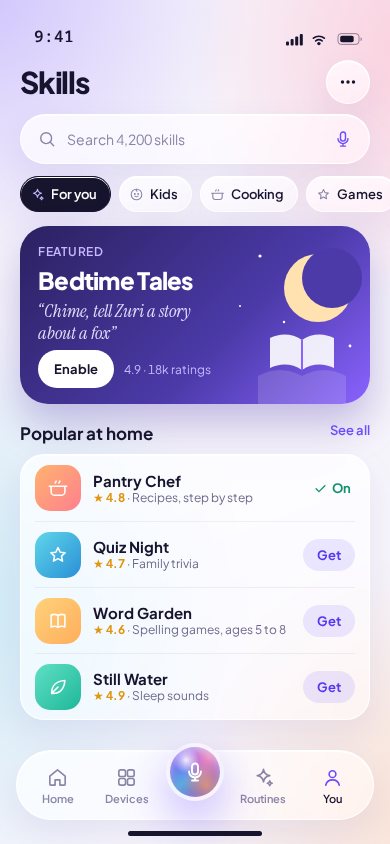
Chime is a complete voice assistant and smart speaker app: welcome, sign in and speaker setup, a home with the listening orb, now playing, a running timer and favourite devices, a live listening screen with transcript, an answer thread with a weather card and reminder, devices grouped by room, a living room with scenes and a thermostat dial, a light with a brightness capsule, routines with a builder and a success screen, timers and alarms, a shared shopping list, drop in, announcements, music on a speaker group, a skills directory, voice history with privacy controls, weekly activity, a Plus plan, notifications, a household profile and settings. Pearly lilac glass with an iridescent violet orb.
| Detail | Value |
|---|---|
| Screen type | Search |
| App | Chime: Voice assistant and smart speaker |
| Category | Smart home |
| Design language | Glass, light |
| Type | Instrument Serif for headings, Plus Jakarta Sans for text |
| Colours | #f6f4fb background, #ffffff surface, #17142e text, #6d6889 text-muted, #6c4cff accent, #ffffff accent-contrast, #ff8fb8 secondary, #e6e2f2 border, #f0466e danger |
What this screen says
- Skills
- Search 4,200 skills
- For you Kids Cooking Games Calm
- Featured
- Bedtime Tales
- “Chime, tell Zuri a story about a fox”
- Enable4.9 · 18k ratings
- Popular at home
- See all
- Pantry Chef
- ★ 4.8 · Recipes, step by step
- On
- Quiz Night
- ★ 4.7 · Family trivia
- Get
- Word Garden
- ★ 4.6 · Spelling games, ages 5 to 8
- Still Water
- ★ 4.9 · Sleep sounds
- Home
- Devices
- Routines
- You
Around it in Chime
More search and explore screens
- Dusk Add device: Smart home scenarios
- Abode Add device: Smart home devices
- Boxed Add item: Book movers and plan moving day
- Meter Help: Your energy supplier account
- Couch Search: TV remote, casting and watchlist
- Mesh Search: Home Wi-Fi network
- Decibel Browse: Multi-room speakers
- Porch Search: Home security cameras
- Sundial Find a pro: Solar panels and home battery
- Puddle Plant library: Garden watering and sprinklers
- Upkeep Home plan: Home maintenance calendar
- Glow Scenes: Light scenes and colour
Every smart home app search screen
What makes a good search screen
- Show something before people type. Recent searches, popular items or categories make the empty search screen useful and save typing.
- Suggest as people type. Autocomplete with matching items, not only matching words, lets people jump straight to a result.
- Make filters visible and reversible. Show active filters as chips that can be removed in one tap, and the number of results as filters change.
- Forgive typos. Close matches and "Did you mean" stop a spelling mistake from ending in an empty screen.
The full search screen guide and every example
Remix Chime free: describe your own app and it is drawn in this design. Or get its files from $10: Figma, React Native, SwiftUI, Flutter and HTML.