Templates · Search and explore screens · Smart home app · Abode
Abode Add device screen
A search screen from Abode, a smart home devices app template in a Minimal style. Screen 15 of 25.
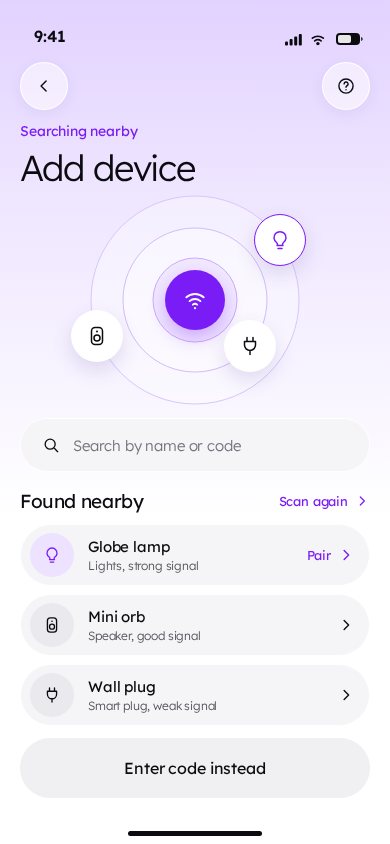
Abode is a complete smart home app centred on devices: welcome, sign in and a code, a home with the weather, what is playing, quick access and favourite scenes, every device by room, detailed controls for the air conditioner, TV, speaker, robot vacuum, lights and blinds, timers, pairing a new device, scenes you can build and run, a weekly schedule, energy use, a plan, profile and settings. White and pale grey with a lilac wash, electric violet and black.
| Detail | Value |
|---|---|
| Screen type | Search |
| App | Abode: Smart home devices |
| Category | Smart home |
| Design language | Minimal, light |
| Type | Lexend |
| Colours | #ffffff background, #f5f5f7 surface, #0c0c10 text, #74747f text-muted, #7a1cf5 accent, #ffffff accent-contrast, #ece2ff secondary, #e9e9ee border, #e5484d danger |
What this screen says
- Searching nearby
- Add device
- Search by name or code
- Found nearby
- Scan again
- Globe lamp
- Lights, strong signal
- Pair
- Mini orb
- Speaker, good signal
- Wall plug
- Smart plug, weak signal
- Enter code instead
Around it in Abode
More search and explore screens
- Puddle Plant library: Garden watering and sprinklers
- Upkeep Home plan: Home maintenance calendar
- Glow Scenes: Light scenes and colour
- Tagged Search: Home inventory for insurance
- Lobby Amenities: Apartment building app
- Dusk Add device: Smart home scenarios
- Boxed Add item: Book movers and plan moving day
- Meter Help: Your energy supplier account
- Couch Search: TV remote, casting and watchlist
- Chime Skills: Voice assistant and smart speaker
- Mesh Search: Home Wi-Fi network
- Decibel Browse: Multi-room speakers
Every smart home app search screen
What makes a good search screen
- Show something before people type. Recent searches, popular items or categories make the empty search screen useful and save typing.
- Suggest as people type. Autocomplete with matching items, not only matching words, lets people jump straight to a result.
- Make filters visible and reversible. Show active filters as chips that can be removed in one tap, and the number of results as filters change.
- Forgive typos. Close matches and "Did you mean" stop a spelling mistake from ending in an empty screen.
The full search screen guide and every example
Remix Abode free: describe your own app and it is drawn in this design. Or get its files from $10: Figma, React Native, SwiftUI, Flutter and HTML.