Templates · Home screens · Smart home app · Sundial
Sundial Today screen
A home screen from Sundial, a solar panels and home battery app template in a Glass style. Screen 4 of 25.
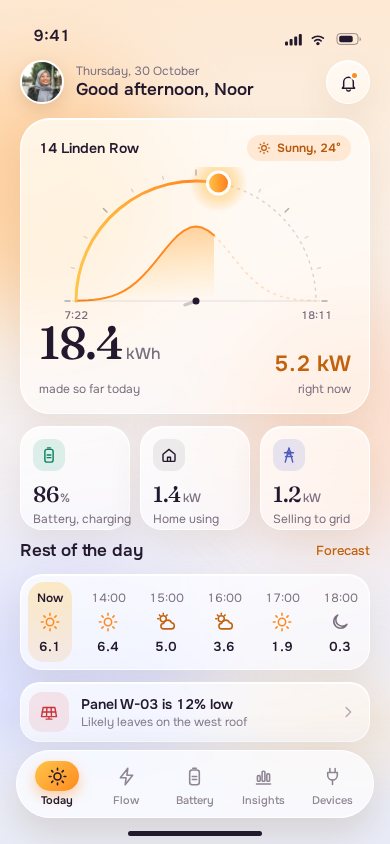
Sundial is a complete solar and home battery app: welcome, sign in and connecting the inverter hub, a today screen built around a sundial arc, a live energy flow between roof, battery, home and grid, the battery with its backup reserve and modes, a roof map of every panel and a single panel's output, a seven day sun forecast, history and savings, smart devices with solar only car charging, automation rules, grid export earnings, booking a panel clean with a local installer through to confirmation, a Plus plan, notifications, profile and settings. Apricot and lilac glass with marigold, teal and periwinkle.
| Detail | Value |
|---|---|
| Screen type | Home |
| App | Sundial: Solar panels and home battery |
| Category | Smart home |
| Design language | Glass, light |
| Type | Fraunces for headings, Onest for text |
| Colours | #faf1e8 background, #ffffff surface, #23192e text, #7a6f7f text-muted, #ff8a1f accent, #23192e accent-contrast, #16a37a secondary, #6c7bd9 grid, #ffffff border, #e5484d danger |
What this screen says
- Thursday, 30 October
- Good afternoon, Noor
- 14 Linden Row
- Sunny, 24°
- 18.4kWh
- made so far today
- 5.2 kW
- right now
- Battery, charging
- 1.4kW
- Home using
- 1.2kW
- Selling to grid
- Rest of the day
- Forecast
- Now 6.1
- Panel W-03 is 12% low
- Likely leaves on the west roof
- Today
- Flow
- Battery
- Insights
- Devices
Around it in Sundial
More home screens
- Lumen Home: Smart home energy
- Abode Home: Smart home devices
- Boxed Home: Book movers and plan moving day
- Meter Home: Your energy supplier account
- Couch For you: TV remote, casting and watchlist
- Chime Home: Voice assistant and smart speaker
- Latch Home: Smart locks and guest access
- Mesh Home: Home Wi-Fi network
- Decibel Rooms: Multi-room speakers
- Nursery Home: Baby monitor camera and sleep
- Porch Home: Home security cameras
- Puddle Garden: Garden watering and sprinklers
Every smart home app home screen
What makes a good home screen
- Put the most important thing first. Decide the one thing most people come for, like today's workout, a balance or the next booking, and give it the top of the screen.
- Make it feel current. Greetings with the time of day, today's date, fresh numbers and recent activity tell people the app is alive and about them.
- Keep quick actions within thumb reach. The two or three things people do most should be one tap away, in the lower part of the screen or a floating button.
- Group related content in clear sections. Use headings and spacing so the screen scans as a few blocks, not a long mixed list.
The full home screen guide and every example
Remix Sundial free: describe your own app and it is drawn in this design. Or get its files from $10: Figma, React Native, SwiftUI, Flutter and HTML.