Templates · Home screens · Smart home app · Upkeep
Upkeep Today screen
A home screen from Upkeep, a home maintenance calendar app template in a Minimal style. Screen 4 of 25.
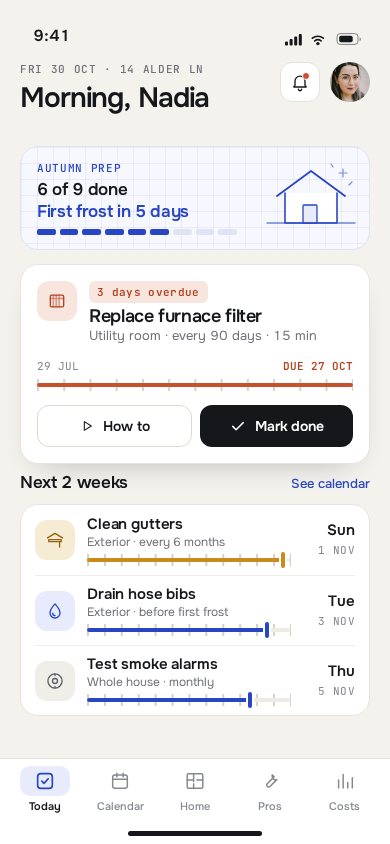
Upkeep is a complete home maintenance app: welcome, home setup and sign in, a today screen with the overdue task and the next two weeks, a month calendar, task details with a step by step guide, logging a task and its confirmation, new recurring tasks, a blueprint floor plan with pinned tasks, rooms, equipment with lifespans, an appliance page, a rating label scanner, finding, booking and confirming a local pro, costs, a home log, notifications, Upkeep Plus, profile and settings. Stone and white with cobalt blueprint drawings, ochre for soon and brick for late.
| Detail | Value |
|---|---|
| Screen type | Home |
| App | Upkeep: Home maintenance calendar |
| Category | Smart home |
| Design language | Minimal, light |
| Type | Onest |
| Colours | #f3f2ed background, #ffffff surface, #15171a text, #6f7277 text-muted, #2846c4 accent, #ffffff accent-contrast, #c98a1b secondary, #e6e4dc border, #c9502c danger |
What this screen says
- Fri 30 Oct · 14 Alder Ln
- Morning, Nadia
- Autumn prep
- 6 of 9 done
- First frost in 5 days
- 3 days overdue
- Replace furnace filter
- Utility room · every 90 days · 15 min
- 29 JUL DUE 27 OCT
- How to
- Mark done
- Next 2 weeks
- See calendar
- Clean gutters
- Exterior · every 6 months
- Sun1 NOV
- Drain hose bibs
- Exterior · before first frost
- Tue3 NOV
- Test smoke alarms
- Whole house · monthly
- Thu5 NOV
- Today
- Calendar
- Home
- Pros
- Costs
Around it in Upkeep
More home screens
- Chime Home: Voice assistant and smart speaker
- Latch Home: Smart locks and guest access
- Mesh Home: Home Wi-Fi network
- Decibel Rooms: Multi-room speakers
- Nursery Home: Baby monitor camera and sleep
- Porch Home: Home security cameras
- Sundial Today: Solar panels and home battery
- Puddle Garden: Garden watering and sprinklers
- Kelvin Home: Climate and thermostat
- Glow Home: Light scenes and colour
- Tagged Home: Home inventory for insurance
- Lobby Home: Apartment building app
Every smart home app home screen
What makes a good home screen
- Put the most important thing first. Decide the one thing most people come for, like today's workout, a balance or the next booking, and give it the top of the screen.
- Make it feel current. Greetings with the time of day, today's date, fresh numbers and recent activity tell people the app is alive and about them.
- Keep quick actions within thumb reach. The two or three things people do most should be one tap away, in the lower part of the screen or a floating button.
- Group related content in clear sections. Use headings and spacing so the screen scans as a few blocks, not a long mixed list.
The full home screen guide and every example
Remix Upkeep free: describe your own app and it is drawn in this design. Or get its files from $10: Figma, React Native, SwiftUI, Flutter and HTML.