Templates · Home screens · Productivity app · Swarm
Swarm Transfers screen
A home screen from Swarm, a torrent client app template in a Dark-first style. Screen 3 of 25.
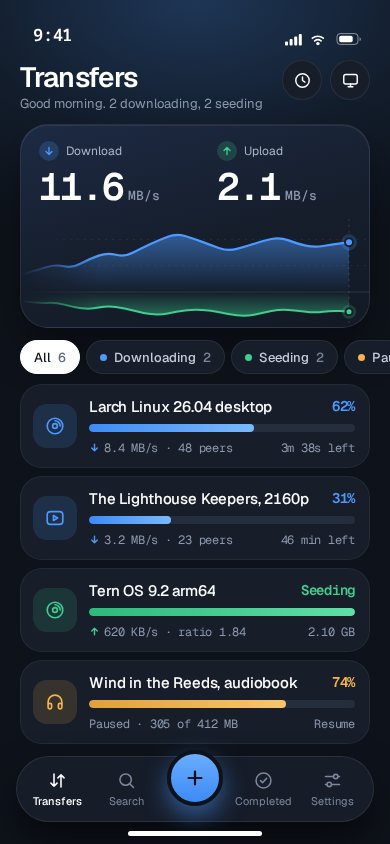
Swarm is a complete torrent client for open and public domain files: welcome, storage access, a transfers home with a live speed card, adding a torrent by magnet link, choosing files and a save location, a torrent page with files, peers, trackers and a piece map, speed history, search and results, feeds with auto download rules, a completed library with a player, schedule, speed limits, network, desktop pairing, a Pro plan and settings. Deep slate navy with download blue, seed green and amber.
| Detail | Value |
|---|---|
| Screen type | Home |
| App | Swarm: Torrent client |
| Category | Productivity |
| Design language | Dark-first, dark |
| Type | Geist |
| Colours | #0e131b background, #171e2a surface, #ffffff text, #8c98ad text-muted, #4c9aff accent, #06101f accent-contrast, #3ecf8e secondary, #242d3c border, #ff6b6b danger |
What this screen says
- Transfers
- Good morning. 2 downloading, 2 seeding
- Download
- 11.6MB/s
- Upload
- 2.1MB/s
- All6
- Downloading2
- Seeding2
- Paused1
- Queued1
- Larch Linux 26.04 desktop62%
- 8.4 MB/s · 48 peers 3m 38s left
- The Lighthouse Keepers, 2160p31%
- 3.2 MB/s · 23 peers 46 min left
- Tern OS 9.2 arm64Seeding
- 620 KB/s · ratio 1.84 2.10 GB
- Wind in the Reeds, audiobook74%
- Paused · 305 of 412 MB Resume
- Search
- Completed
- Settings
Around it in Swarm
More home screens
- Inkwell Today: Daily journal
- Shortlist Home: Job search and application tracker
- Parley Home: Team messenger
- Docket Home: Task and sprint planner
- Kanso Home: Tasks, calendar and chat
- Margin Home: AI note taking
- Aide Home: Executive AI assistant
- Juno Home: AI chat assistant
- Jot Notes: Quick notes and checklists
- Chrono World: World clock, timers and stopwatch
- Frontdesk Home: Customer support inbox
- Campaign Home: Email marketing campaigns
Every productivity app home screen
What makes a good home screen
- Put the most important thing first. Decide the one thing most people come for, like today's workout, a balance or the next booking, and give it the top of the screen.
- Make it feel current. Greetings with the time of day, today's date, fresh numbers and recent activity tell people the app is alive and about them.
- Keep quick actions within thumb reach. The two or three things people do most should be one tap away, in the lower part of the screen or a floating button.
- Group related content in clear sections. Use headings and spacing so the screen scans as a few blocks, not a long mixed list.
The full home screen guide and every example
Remix Swarm free: describe your own app and it is drawn in this design. Or get its files from $10: Figma, React Native, SwiftUI, Flutter and HTML.