Templates · Settings screens · Productivity app · Stash
Stash Settings screen
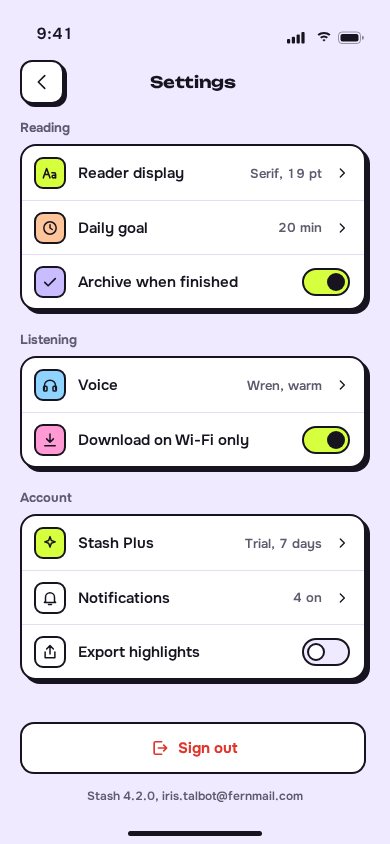
A settings screen from Stash, a productivity app template in a Neubrutalism style. Screen 25 of 25.
Stash is a complete read-it-later app: welcome, interests and sign in, a home with the article you are halfway through and what is up next, a library with collections, full text search, a reader with highlights and notes, display settings, listening with a waveform player, a highlights feed, shareable quote cards, collections, saving a link with a stashed confirmation, a daily review of old highlights, reading stats, a newsletter inbox, a publication page, a Plus plan with checkout, notifications, profile and settings. Lilac paper, ink borders and hard shadows, with lime highlighter kept for what you saved, what is selected and the main action.
| Detail | Value |
|---|---|
| Screen type | Settings |
| App | Stash: Read-it-later and highlights |
| Category | Productivity |
| Design language | Neubrutalism, light |
| Type | Unbounded for headings, Onest for text |
| Colours | #efeaff background, #ffffff surface, #17141f text, #5f5a6e text-muted, #d6ff3d accent, #17141f accent-contrast, #7a5cff secondary, #17141f border, #ff5a4e danger |
What this screen says
- Settings
- Reading
- Reader display Serif, 19 pt
- Daily goal 20 min
- Archive when finished
- Listening
- Voice Wren, warm
- Download on Wi-Fi only
- Account
- Stash Plus Trial, 7 days
- Notifications 4 on
- Export highlights
- Sign out
- Stash 4.2.0, iris.talbot@fernmail.com
Around it in Stash
More settings screens
- Convene Settings: Video meetings
- Unplug Settings: Screen time blocker
- Streak Reminders: Small days, long chains
- Deskly Settings: Hybrid office booking
- Pomo Settings: Focus timer
- Postbox Settings: Email for busy teams
- Daybook Settings: Calendar and planner
- Scanly Settings: Document scanner
- Keyring Autofill: Password manager
- Rota Settings: Shift scheduling for hourly teams
- Inkwell Settings: Daily journal
- Shortlist Settings: Job search and application tracker
Every productivity app settings screen
What makes a good settings screen
- Group options into clear sections. Account, notifications, privacy, appearance and help, with headings, so people scan to the right group.
- Label settings by their effect. "Daily reminder at 8:00" is clearer than "Reminders". Add a short description under options that need one.
- Use the right control. Toggles for on and off, a row that opens a list for choices, and sliders only for ranges.
- Apply changes immediately. Most mobile settings take effect when changed, with no Save button to forget.
The full settings screen guide and every example
Remix Stash free: describe your own app and it is drawn in this design. Or get its files from $10: Figma, React Native, SwiftUI, Flutter and HTML.