Templates · Settings screens · Productivity app · Deskly
Deskly Settings screen
A settings screen from Deskly, a hybrid office booking app template in an Enterprise style. Screen 25 of 25.
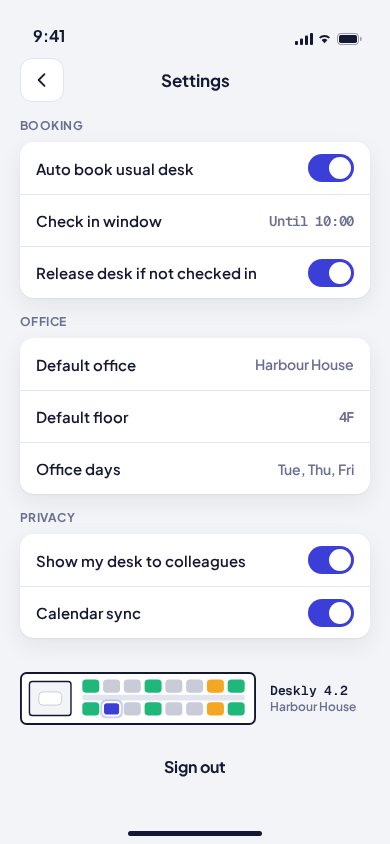
Deskly is a complete hybrid office app: welcome, sign in, picking your office and your office days, a home with today's desk on the plan, a live floor plan, desk detail and booking, check in, meeting rooms with capacity and equipment, who is in, finding a colleague, search, your bookings and week, visitors with a pass and a drawn QR square, insights, a Teams plan, notifications, profile and settings. Every plan, room and pass is drawn.
| Detail | Value |
|---|---|
| Screen type | Settings |
| App | Deskly: Hybrid office booking |
| Category | Productivity |
| Design language | Enterprise, light |
| Type | Plus Jakarta Sans |
| Colours | #f3f4f7 background, #ffffff surface, #151833 text, #6b7090 text-muted, #3b3fd8 accent, #ffffff accent-contrast, #1fb87a success, #f5a623 warning, #e3e5ee border |
What this screen says
- Settings
- Booking
- Auto book usual desk
- Check in window Until 10:00
- Release desk if not checked in
- Office
- Default office Harbour House
- Default floor 4F
- Office days Tue, Thu, Fri
- Privacy
- Show my desk to colleagues
- Calendar sync
- Deskly 4.2
- Harbour House
- Sign out
Around it in Deskly
More settings screens
- Opal Settings: Studio dashboard
- Jot Settings: Quick notes and checklists
- Chrono Settings: World clock, timers and stopwatch
- Frontdesk Settings: Customer support inbox
- Campaign Settings: Email marketing campaigns
- Outpost Settings: Schedule social posts
- Pageview Settings: Website analytics
- Polish Settings: Writing assistant and keyboard
- Tapline Settings: Link-in-bio pages and analytics
- Quill Settings: Docs, wikis and databases in one workspace
- Tandem Settings: Team chat, channels and huddles
- Shipyard Settings: Issue tracking for product teams
Every productivity app settings screen
What makes a good settings screen
- Group options into clear sections. Account, notifications, privacy, appearance and help, with headings, so people scan to the right group.
- Label settings by their effect. "Daily reminder at 8:00" is clearer than "Reminders". Add a short description under options that need one.
- Use the right control. Toggles for on and off, a row that opens a list for choices, and sliders only for ranges.
- Apply changes immediately. Most mobile settings take effect when changed, with no Save button to forget.
The full settings screen guide and every example
Remix Deskly free: describe your own app and it is drawn in this design. Or get its files from $10: Figma, React Native, SwiftUI, Flutter and HTML.