Templates · Home screens · Social app · Spark
Spark Discover screen
A home screen from Spark, a swipe dating app template in a Playful style. Screen 6 of 25.
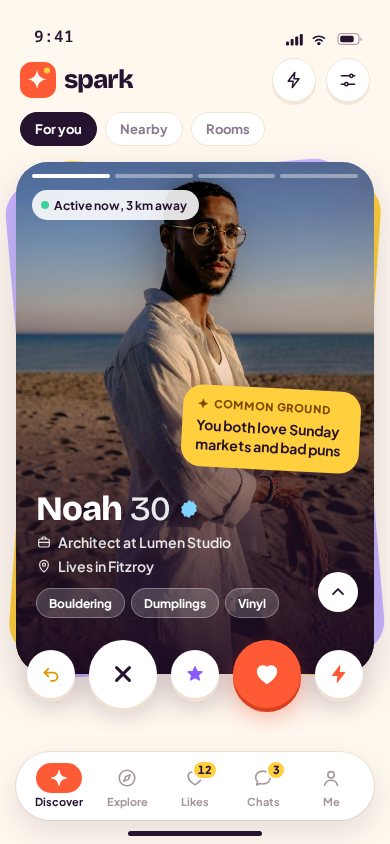
Spark is a complete swipe dating app: welcome, phone sign in and code, the basics and photos, a discover deck with a common ground sticker, a full profile with prompts, filters, the match moment, likes behind a paywall, chats with new matches, a conversation that turns into a date plan, a video date with icebreakers, answering a prompt, edit profile, buying and running a Boost, booking the date and its confirmation, explore rooms, insights, notifications, a Plus plan, your profile and settings. Warm cream with tangerine, butter yellow, lilac and deep plum.
| Detail | Value |
|---|---|
| Screen type | Home |
| App | Spark: Swipe dating |
| Category | Social |
| Design language | Playful, light |
| Type | Bricolage Grotesque for headings, Plus Jakarta Sans for text |
| Colours | #fff8ef background, #ffffff surface, #26132f text, #8a7a8f text-muted, #ff5a36 accent, #ffffff accent-contrast, #ffcf3d secondary, #f1e6d8 border, #e5384f danger |
What this screen says
- spark
- For you Nearby Rooms
- Active now, 3 km away
- Common ground
- You both love Sunday markets and bad puns
- Noah 30
- Architect at Lumen Studio
- Lives in Fitzroy
- Bouldering Dumplings Vinyl
- Discover
- Explore
- Likes12
- Chats3
- Me
Around it in Spark
More home screens
- Wink Home: Video first dating
- Snoot Home: Social app for pets
- Huddle Home: Interest groups and meetups
- Glade Home: Photo and clip social network
- Onair Home: Live streaming
- Drift Home: Reels and voice rooms
- Glitz Discover: Party live streaming
- Hearth Chats: Messenger for trips and circles
- Chirp Chats: Messenger with file sharing
- Banter Chats: Live messenger
- Natter Chats: Minimal messenger
- Nearly Home: Dating by crossed paths
What makes a good home screen
- Put the most important thing first. Decide the one thing most people come for, like today's workout, a balance or the next booking, and give it the top of the screen.
- Make it feel current. Greetings with the time of day, today's date, fresh numbers and recent activity tell people the app is alive and about them.
- Keep quick actions within thumb reach. The two or three things people do most should be one tap away, in the lower part of the screen or a floating button.
- Group related content in clear sections. Use headings and spacing so the screen scans as a few blocks, not a long mixed list.
The full home screen guide and every example
Remix Spark free: describe your own app and it is drawn in this design. Or get its files from $10: Figma, React Native, SwiftUI, Flutter and HTML.