Templates · Home screens · Social app · Huddle
Huddle Home screen
A home screen from Huddle, an interest groups and meetups app template in a Dark-first style. Screen 5 of 25.
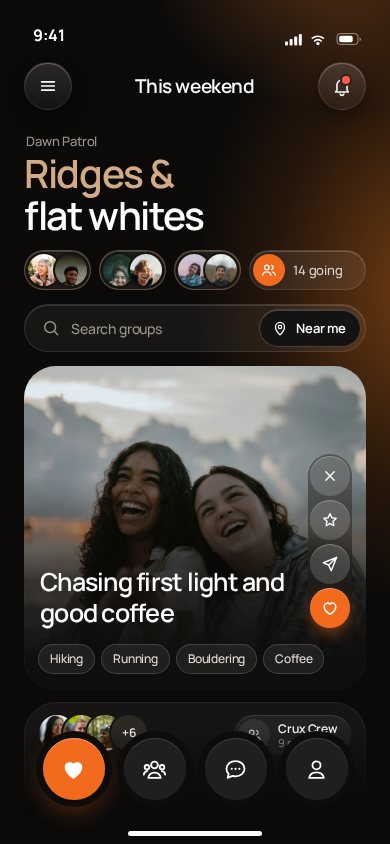
Huddle is a complete app for interest groups that meet up: welcome, picking interests, sign in, a home with your groups and a featured photo card, explore, group pages and members, group chat with voice notes and shared photos, video hangouts, events with RSVPs and a live meeting point, activity stats, notifications, a plus plan, profile and settings. Black with a warm amber glow, tan and white type and one orange.
| Detail | Value |
|---|---|
| Screen type | Home |
| App | Huddle: Interest groups and meetups |
| Category | Social |
| Design language | Dark-first, dark |
| Type | Manrope |
| Colours | #0b0a09 background, #1b1a18 surface, #ffffff text, #9c958c text-muted, #f26a1e accent, #ffffff accent-contrast, #d2ab85 secondary, #2e2b27 border, #ff5a4d danger |
What this screen says
- This weekend
- Dawn Patrol
- Ridges &flat whites
- 14 going
- Search groups
- Near me
- Chasing first light and good coffee
- Hiking Running Bouldering Coffee
- Crux Crew9 members
Around it in Huddle
More home screens
- Aura Home: Moods with close friends
- Kindly Home: Volunteering near you
- Cohort Home: Alumni and mentor network
- Kin Home: Private family circle
- Confetti Home: Party invites and RSVPs
- Ripple Home: Voice notes social
- Duo Home: An app for two
- Soapbox Floor: Weekly debates and polls
- Ballot Home: Settle it on paper
- Murmur Home: Chat rooms for art lovers
- Wink Home: Video first dating
- Snoot Home: Social app for pets
What makes a good home screen
- Put the most important thing first. Decide the one thing most people come for, like today's workout, a balance or the next booking, and give it the top of the screen.
- Make it feel current. Greetings with the time of day, today's date, fresh numbers and recent activity tell people the app is alive and about them.
- Keep quick actions within thumb reach. The two or three things people do most should be one tap away, in the lower part of the screen or a floating button.
- Group related content in clear sections. Use headings and spacing so the screen scans as a few blocks, not a long mixed list.
The full home screen guide and every example
Remix Huddle free: describe your own app and it is drawn in this design. Or get its files from $10: Figma, React Native, SwiftUI, Flutter and HTML.