Templates · Home screens · Social app · Nearly
Nearly Home screen
A home screen from Nearly, a dating by crossed paths app template in a Glass style. Screen 8 of 25.
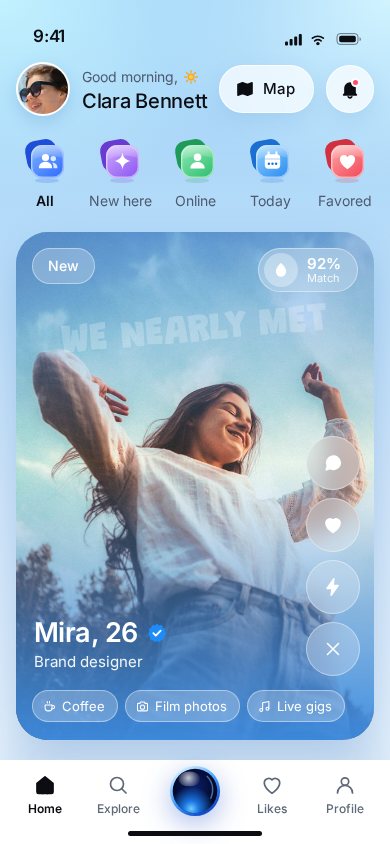
Nearly is a complete dating app built around the people you walk past: onboarding, sign in, profile setup, a home deck of big portrait cards with match scores, a radar map of who is nearby, explore and filters, a profile with every place you crossed, likes, a match moment, chats, date planning, hotspots, insights, a membership paywall, profile and settings. Sky blue and frosted glass with a playful headline font.
| Detail | Value |
|---|---|
| Screen type | Home |
| App | Nearly: Dating by crossed paths |
| Category | Social |
| Design language | Glass, light |
| Type | Inter |
| Colours | #e6f3ff background, #ffffff surface, #0b0d12 text, #66758c text-muted, #1d8cf8 accent, #ffffff accent-contrast, #0b0d12 secondary, #d6e6f7 border, #ff4d6a danger |
What this screen says
- Good morning,
- Clara Bennett
- Map
- All
- New here
- Online
- Today
- Favored
- WE NEARLY MET
- New
- 92%Match
- Mira, 26
- Brand designer
- Coffee Film photos Live gigs
- Home
- Explore
- Likes
- Profile
Around it in Nearly
More home screens
- Guild Home: Community servers with voice and text chat
- Parrot Chats: Private messaging, groups and calls
- Carrier Chats: Cloud messaging with channels
- Vista Home: Photos, stories and reels
- Flick For you: Short video feed
- Squawk Home: Short posts and live conversation
- Agora Home: Communities, threads and votes
- Spark Discover: Swipe dating
- Candid Locked feed: One real photo a day
- Blink Camera: Camera chat and stories
- Cipher Chats: Encrypted private messenger
- Commons Feed: Friends, groups and events
What makes a good home screen
- Put the most important thing first. Decide the one thing most people come for, like today's workout, a balance or the next booking, and give it the top of the screen.
- Make it feel current. Greetings with the time of day, today's date, fresh numbers and recent activity tell people the app is alive and about them.
- Keep quick actions within thumb reach. The two or three things people do most should be one tap away, in the lower part of the screen or a floating button.
- Group related content in clear sections. Use headings and spacing so the screen scans as a few blocks, not a long mixed list.
The full home screen guide and every example
Remix Nearly free: describe your own app and it is drawn in this design. Or get its files from $10: Figma, React Native, SwiftUI, Flutter and HTML.