Templates · Home screens · Social app · Drift
Drift Home screen
A home screen from Drift, a reels and voice rooms app template in a Dark-first style. Screen 6 of 25.
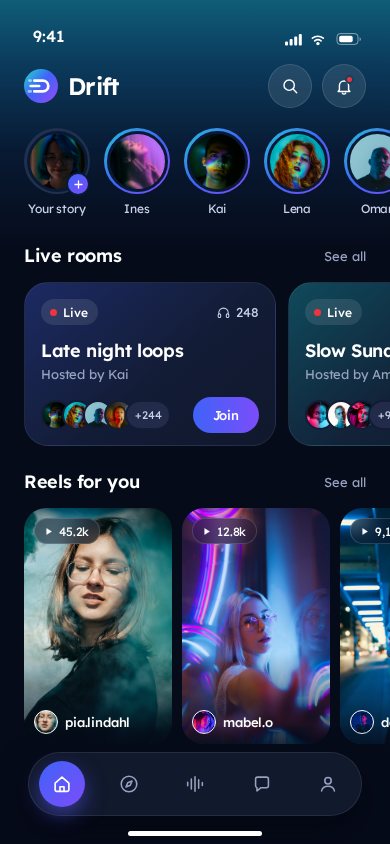
Drift is a complete social app: onboarding, sign in and a code check, picking interests, a home feed with stories and live rooms, a full-bleed reel viewer with comments, explore, voice rooms with a grid of speakers and a reaction bar, starting a room, a camera and post flow, profiles with a photo mosaic, friends and groups, messages, notifications, insights, a plan screen and settings. Midnight navy with a teal glow, an indigo to violet gradient and frosted glass controls.
| Detail | Value |
|---|---|
| Screen type | Home |
| App | Drift: Reels and voice rooms |
| Category | Social |
| Design language | Dark-first, dark |
| Type | Lexend |
| Colours | #060b1a background, #121a2e surface, #ffffff text, #96a2bf text-muted, #5b5cf6 accent, #ffffff accent-contrast, #1fb6c9 secondary, #222c45 border, #f0343c danger |
What this screen says
- Drift
- Your story
- Ines
- Kai
- Lena
- Omar
- Suki
- Live roomsSee all
- Live 248
- Late night loops
- Hosted by Kai
- Join
- Live 96
- Slow Sunday radio
- Hosted by Amara
- Reels for youSee all
- 45.2k
- pia.lindahl
- 12.8k
- mabel.o
- dario.v
Around it in Drift
More home screens
- Cipher Chats: Encrypted private messenger
- Commons Feed: Friends, groups and events
- Tether Circle: Family location and safety
- Facet Calls: Video calls with family and friends
- Stoop Board: Neighbourhood noticeboard
- Aura Home: Moods with close friends
- Kindly Home: Volunteering near you
- Cohort Home: Alumni and mentor network
- Kin Home: Private family circle
- Confetti Home: Party invites and RSVPs
- Ripple Home: Voice notes social
- Duo Home: An app for two
What makes a good home screen
- Put the most important thing first. Decide the one thing most people come for, like today's workout, a balance or the next booking, and give it the top of the screen.
- Make it feel current. Greetings with the time of day, today's date, fresh numbers and recent activity tell people the app is alive and about them.
- Keep quick actions within thumb reach. The two or three things people do most should be one tap away, in the lower part of the screen or a floating button.
- Group related content in clear sections. Use headings and spacing so the screen scans as a few blocks, not a long mixed list.
The full home screen guide and every example
Remix Drift free: describe your own app and it is drawn in this design. Or get its files from $10: Figma, React Native, SwiftUI, Flutter and HTML.