Templates · Home screens · Social app · Natter
Natter Chats screen
A home screen from Natter, a minimal messenger app template in a Minimal style. Screen 4 of 25.
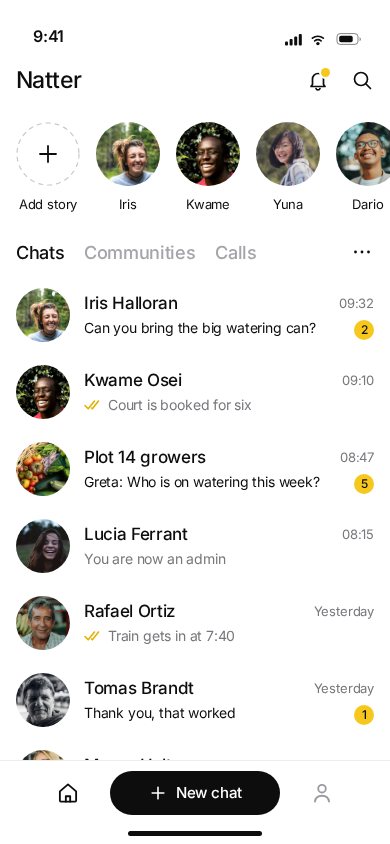
Natter is a complete messenger on pure white: welcome, phone sign in and a code, a chat list under a row of stories, a start new sheet, new chat, new contact and new community, a conversation with a message action sheet (react, copy, reply, forward, delete), forwarding, stories, search, communities, calls, contacts, notifications, a weekly activity summary, a Plus plan, profile and settings. One warm yellow marks what is yours or unread, everything else is black, white and pale grey.
| Detail | Value |
|---|---|
| Screen type | Home |
| App | Natter: Minimal messenger |
| Category | Social |
| Design language | Minimal, light |
| Type | Inter |
| Colours | #ffffff background, #f4f4f5 surface, #0d0d0d text, #77777c text-muted, #f6c81e accent, #0d0d0d accent-contrast, #0d0d0d secondary, #ededee border, #e5484d danger |
What this screen says
- Natter
- Add story
- Iris
- Kwame
- Yuna
- Dario
- ChatsCommunities Calls
- Iris Halloran
- Can you bring the big watering can?
- Kwame Osei
- Court is booked for six
- Plot 14 growers
- Greta: Who is on watering this week?
- Lucia Ferrant
- You are now an admin
- Rafael Ortiz
- Train gets in at 7:40
- Yesterday
- Tomas Brandt
- Thank you, that worked
- Yesterday1
- Maren Holt
- Voice message, 0:42
- Monday
- New chat
Around it in Natter
More home screens
- Squawk Home: Short posts and live conversation
- Agora Home: Communities, threads and votes
- Spark Discover: Swipe dating
- Candid Locked feed: One real photo a day
- Blink Camera: Camera chat and stories
- Cipher Chats: Encrypted private messenger
- Commons Feed: Friends, groups and events
- Tether Circle: Family location and safety
- Facet Calls: Video calls with family and friends
- Stoop Board: Neighbourhood noticeboard
- Aura Home: Moods with close friends
- Kindly Home: Volunteering near you
What makes a good home screen
- Put the most important thing first. Decide the one thing most people come for, like today's workout, a balance or the next booking, and give it the top of the screen.
- Make it feel current. Greetings with the time of day, today's date, fresh numbers and recent activity tell people the app is alive and about them.
- Keep quick actions within thumb reach. The two or three things people do most should be one tap away, in the lower part of the screen or a floating button.
- Group related content in clear sections. Use headings and spacing so the screen scans as a few blocks, not a long mixed list.
The full home screen guide and every example
Remix Natter free: describe your own app and it is drawn in this design. Or get its files from $10: Figma, React Native, SwiftUI, Flutter and HTML.