Templates · Sign in and sign up screens · Education app · Skim
Skim Create account screen
A sign in screen from Skim, a speed reading trainer app template in a Minimal style. Screen 4 of 25.
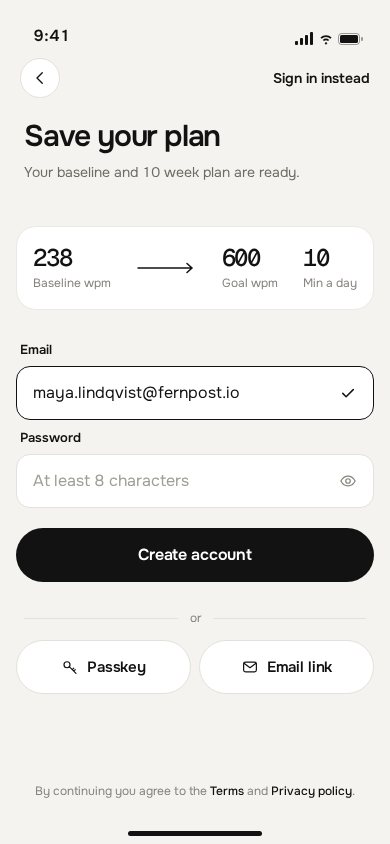
Skim is a complete speed reading trainer: welcome, a baseline reading test, a goal picker and sign up, a today plan, library, discover, a book page, a one word at a time reader, a guided pacer, a comprehension quiz and session results, drills with a live Schulte table, a 21 day course with a lesson, progress and a weekly report, adding your own text, a Pro plan with checkout, notifications, profile and settings. Paper, ink and white with a single vermilion focus letter and a highlighter yellow.
| Detail | Value |
|---|---|
| Screen type | Sign in |
| App | Skim: Speed reading trainer |
| Category | Education |
| Design language | Minimal, light |
| Type | Geist Mono for headings, Onest for text |
| Colours | #f4f3ef background, #ffffff surface, #121212 text, #86837b text-muted, #ff4f1f accent, #ffffff accent-contrast, #ffe14d secondary, #e3e1da border, #d93a2b danger |
What this screen says
- Sign in instead
- Save your plan
- Your baseline and 10 week plan are ready.
- 238Baseline wpm
- 600Goal wpm
- 10Min a day
- maya.lindqvist@fernpost.io
- Password
- At least 8 characters
- Create account
- or
- Passkey
- Email link
- By continuing you agree to the Terms and Privacy policy.
Around it in Skim
More sign in and sign up screens
- Lexis Sign in: A word a day
- Quanta Sign in: Interactive physics lessons
- Cram Sign up: Exam prep and mock tests
- Quad Sign in: University campus app
- Palm Create account: Learn sign language
- Epoch Sign in: History on a timeline
- Wren Sign up: Early reading for kids
- Proof Sign in: Maths tutor that shows its working
- Terra Sign in: Geography and flags quiz
- Gambit Sign in: Chess training
- Buzzer Sign in: Live trivia
- Homeroom Sign in: School, all on one page
Every education app sign in screen
What makes a good login screen
- Offer the fastest option first. Sign in with Apple, Google or a passkey takes one tap. If you support them, put them above the email form. Apple asks apps that use a third-party login like Google to also offer an equivalent privacy-focused option, such as Sign in with Apple.
- Separate sign in from sign up clearly. Use different headings and buttons, and a clear link to switch. People who already have an account should never end up creating a second one by accident.
- Use the right keyboard and autofill. Email fields should open the email keyboard and support password managers and one-time code autofill. Small details, big difference in how many people get through.
- Write errors that help. "That password doesn't match this email" is better than "Error 401". Keep what people typed so they only fix the part that was wrong.
The full login screen guide and every example
Remix Skim free: describe your own app and it is drawn in this design. Or get its files from $10: Figma, React Native, SwiftUI, Flutter and HTML.