Templates · Home screens · Productivity app · Convene
Convene Home screen
A home screen from Convene, a video meetings app template in a Minimal style. Screen 3 of 25.
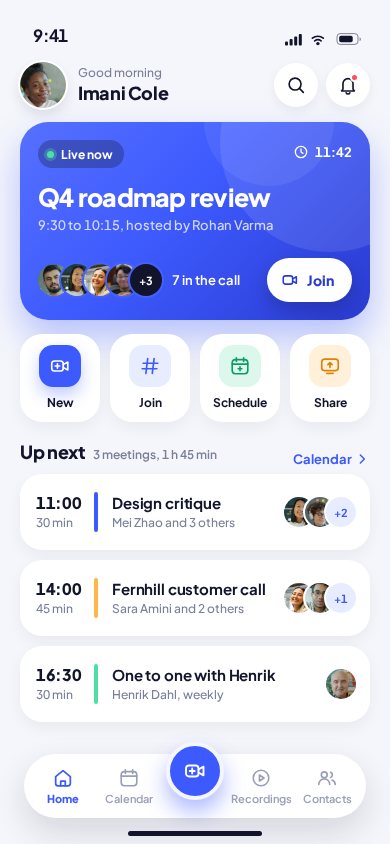
Convene is a complete video meetings app: welcome, sign in, a home with the live meeting and the day's schedule, join with a code, a camera preview, a waiting room, the call in grid and speaker view, screen share, participants, chat, live captions, breakout rooms, polls, an in call actions sheet, a summary with action items, recordings, scheduling, a calendar, contacts, plans and settings. Light and calm outside the call, deep indigo black inside it.
| Detail | Value |
|---|---|
| Screen type | Home |
| App | Convene: Video meetings |
| Category | Productivity |
| Design language | Minimal, light |
| Type | Plus Jakarta Sans |
| Colours | #f5f6fb background, #ffffff surface, #12142b text, #7a7f99 text-muted, #3d5afe accent, #ffffff accent-contrast, #4ce0a5 secondary, #e6e8f2 border, #ff4d5e danger |
What this screen says
- Good morning
- Imani Cole
- Live now
- Q4 roadmap review
- 9:30 to 10:15, hosted by Rohan Varma
- +37 in the call
- Join
- New
- Schedule
- Share
- Up next3 meetings, 1 h 45 min
- Calendar
- 11:0030 min
- Design critique
- Mei Zhao and 3 others
- 14:0045 min
- Fernhill customer call
- Sara Amini and 2 others
- 16:3030 min
- One to one with Henrik
- Henrik Dahl, weekly
- Home
- Recordings
- Contacts
Around it in Convene
More home screens
- Inkwell Today: Daily journal
- Shortlist Home: Job search and application tracker
- Parley Home: Team messenger
- Docket Home: Task and sprint planner
- Kanso Home: Tasks, calendar and chat
- Margin Home: AI note taking
- Aide Home: Executive AI assistant
- Juno Home: AI chat assistant
- Jot Notes: Quick notes and checklists
- Chrono World: World clock, timers and stopwatch
- Frontdesk Home: Customer support inbox
- Campaign Home: Email marketing campaigns
Every productivity app home screen
What makes a good home screen
- Put the most important thing first. Decide the one thing most people come for, like today's workout, a balance or the next booking, and give it the top of the screen.
- Make it feel current. Greetings with the time of day, today's date, fresh numbers and recent activity tell people the app is alive and about them.
- Keep quick actions within thumb reach. The two or three things people do most should be one tap away, in the lower part of the screen or a floating button.
- Group related content in clear sections. Use headings and spacing so the screen scans as a few blocks, not a long mixed list.
The full home screen guide and every example
Remix Convene free: describe your own app and it is drawn in this design. Or get its files from $10: Figma, React Native, SwiftUI, Flutter and HTML.