Templates · Player, camera and editor screens · Travel app · Scoot
Scoot Scan screen
A media screen from Scoot, an e-scooter and e-bike rental app template in a Gen Z style. Screen 9 of 25.
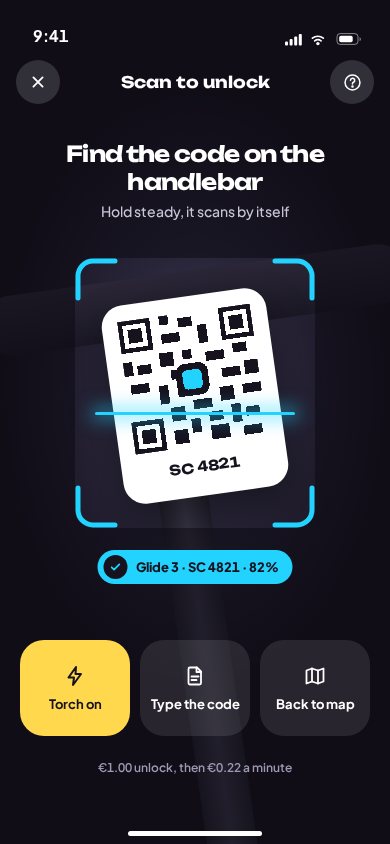
Scoot is a complete e-scooter and e-bike rental app: welcome, sign in and code, a live map of nearby scooters and bikes with battery tags, search, scooter and e-bike details with ring and reserve, parking, slow and no-go zones, scan to unlock, a live ride with timer, cost and speed, parking guidance, a parking photo, a ride summary with rating, ride history and a ride receipt, stats, passes with checkout and confirmation, a wallet, safety tips, notifications, profile and settings. Lilac and white with ink, electric cyan, hot pink and sunny yellow.
| Detail | Value |
|---|---|
| Screen type | Media |
| App | Scoot: E-scooter and e-bike rental |
| Category | Travel |
| Design language | Gen Z, light |
| Type | Unbounded for headings, Plus Jakarta Sans for text |
| Colours | #f4f2fb background, #ffffff surface, #16131f text, #6e6a80 text-muted, #22d3ff accent, #16131f accent-contrast, #ff5ac8 secondary, #e6e2f2 border, #ff4d3d danger |
What this screen says
- SC 4821
- Scan to unlock
- Find the code on the handlebar
- Hold steady, it scans by itself
- Glide 3 · SC 4821 · 82%
- Torch on
- Type the code
- Back to map
- €1.00 unlock, then €0.22 a minute
Around it in Scoot
More player, camera and editor screens
- Detour Voice: Community driving navigation
- Roadster Move: Your electric car, from your phone
- Fairground Photos: Theme park tickets, wait times and map
- Nomad QR code: Travel eSIM data plans
- Berth Night stories: Night trains and sleeper cabins
- Caravan Van guide: Campervan rental and road trips
- Permit Scan passport: Visas and travel documents wallet
- Backroad Postcard: Road trip planner with stops
- Piazza Audio guide: Self-guided city walking tours
- Fjord Bow camera: Cruise companion on board
- Museo Audio guide: Museum guide
- Spoke Scan: Bike sharing
What makes a good media player screen
- Content takes the space. Artwork, video or the camera view should fill most of the screen.
- Primary controls in the thumb zone. Play and pause, the shutter or the main tool, large and low on the screen.
- Show progress and position. A scrubber with elapsed and remaining time, or the step in a lesson.
- Hide secondary controls until needed. Lyrics, queue, filters and advanced tools can live behind a tap or a swipe.
The full media player screen guide and every example
Remix Scoot free: describe your own app and it is drawn in this design. Or get its files from $10: Figma, React Native, SwiftUI, Flutter and HTML.