Templates · Player, camera and editor screens · Travel app · Roadster
Roadster Move screen
A media screen from Roadster, a travel app template in a Dark-first style. Screen 11 of 25.
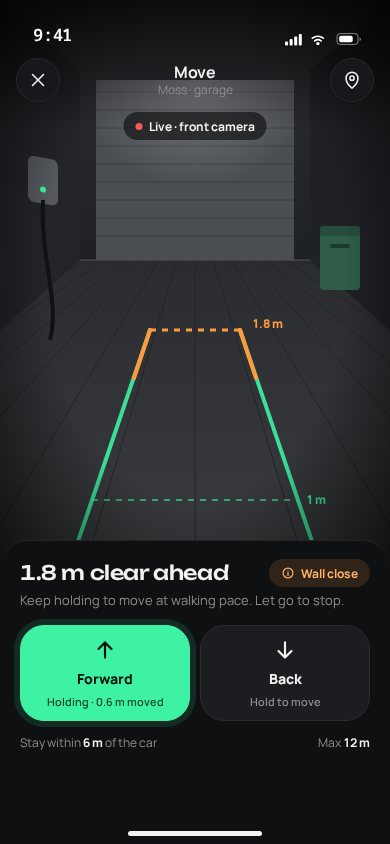
Roadster is a complete app for owning an electric car: welcome, sign in, phone key setup, a car home with range, lock and quick controls, controls with trunks, lights and tyre pressures, climate with a temperature arc and seat heaters, a live charging session, a charge schedule with off-peak prices, nearby fast chargers, the car on a map, moving it with the front camera, trips and a trip with its consumption, monthly energy, service with booking, a slot and a confirmation, phone keys and sharing a key, a software update, a Plus plan, alerts, account and settings. Asphalt black with charge green and heat amber.
| Detail | Value |
|---|---|
| Screen type | Media |
| App | Roadster: Your electric car, from your phone |
| Category | Travel |
| Design language | Dark-first, dark |
| Type | Unbounded for headings, Manrope for text |
| Colours | #0a0a0b background, #141517 surface, #f2f2ef text, #8c8e94 text-muted, #3df2a3 accent, #03140c accent-contrast, #ff9a3d secondary, #232428 border, #ff5a52 danger |
What this screen says
- Move
- Moss · garage
- Live · front camera
- 1.8 m clear ahead
- Wall close
- Keep holding to move at walking pace. Let go to stop.
- ForwardHolding · 0.6 m moved
- BackHold to move
- Stay within 6 m of the car Max 12 m
Around it in Roadster
More player, camera and editor screens
- Keycard Digital key: Hotel stays, digital key and room service
- Detour Voice: Community driving navigation
- Fairground Photos: Theme park tickets, wait times and map
- Scoot Scan: E-scooter and e-bike rental
- Nomad QR code: Travel eSIM data plans
- Berth Night stories: Night trains and sleeper cabins
- Caravan Van guide: Campervan rental and road trips
- Permit Scan passport: Visas and travel documents wallet
- Backroad Postcard: Road trip planner with stops
- Piazza Audio guide: Self-guided city walking tours
- Fjord Bow camera: Cruise companion on board
- Museo Audio guide: Museum guide
What makes a good media player screen
- Content takes the space. Artwork, video or the camera view should fill most of the screen.
- Primary controls in the thumb zone. Play and pause, the shutter or the main tool, large and low on the screen.
- Show progress and position. A scrubber with elapsed and remaining time, or the step in a lesson.
- Hide secondary controls until needed. Lyrics, queue, filters and advanced tools can live behind a tap or a swipe.
The full media player screen guide and every example
Remix Roadster free: describe your own app and it is drawn in this design. Or get its files from $10: Figma, React Native, SwiftUI, Flutter and HTML.