Templates · Player, camera and editor screens · Travel app · Caravan
Caravan Van guide screen
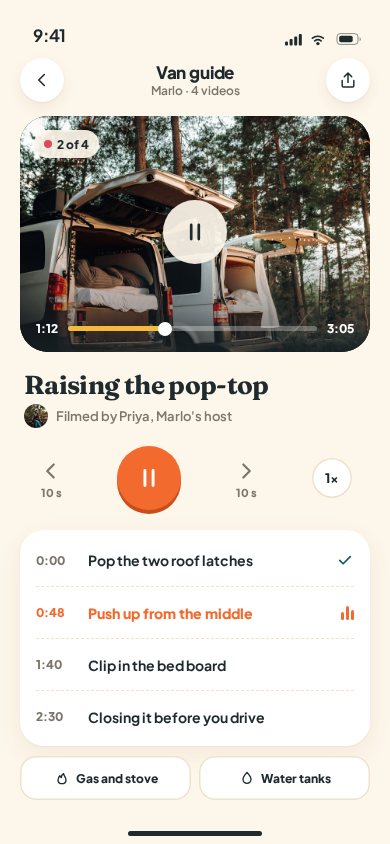
A media screen from Caravan, a campervan rental and road trips app template in a Playful style. Screen 19 of 25.
Caravan is a complete campervan rental and road trip app: welcome and sign in, an explore home, van search with results, a van page with a drawn floor plan, dates, extras, checkout and a booked screen, trips and a trip hub, pickup check-in, a route planner, live driving on a drawn coastal map, overnight spots and a spot page, a video van guide, a road journal, a postcard maker, notifications, a Club plan, profile and settings. Sun cream and teal with 70s livery stripes in mustard, tangerine and cherry.
| Detail | Value |
|---|---|
| Screen type | Media |
| App | Caravan: Campervan rental and road trips |
| Category | Travel |
| Design language | Playful, light |
| Type | Fraunces for headings, Plus Jakarta Sans for text |
| Colours | #fdf6ea background, #ffffff surface, #1f2a2e text, #7b766b text-muted, #f26a2e accent, #ffffff accent-contrast, #0f5c5a secondary, #efe2cb border, #e0485c danger |
What this screen says
- Van guide
- Marlo · 4 videos
- 2 of 4
- Raising the pop-top
- Filmed by Priya, Marlo's host
- 10 s 10 s 1×
- 0:00Pop the two roof latches
- 0:48Push up from the middle
- 1:40Clip in the bed board
- 2:30Closing it before you drive
- Gas and stove Water tanks
Around it in Caravan
More player, camera and editor screens
- Ignition Check in: Car rental from local hosts
- Contrail Entertainment: Airline booking, check-in and boarding
- Keycard Digital key: Hotel stays, digital key and room service
- Detour Voice: Community driving navigation
- Roadster Move: Your electric car, from your phone
- Fairground Photos: Theme park tickets, wait times and map
- Scoot Scan: E-scooter and e-bike rental
- Nomad QR code: Travel eSIM data plans
- Berth Night stories: Night trains and sleeper cabins
- Permit Scan passport: Visas and travel documents wallet
- Backroad Postcard: Road trip planner with stops
- Piazza Audio guide: Self-guided city walking tours
What makes a good media player screen
- Content takes the space. Artwork, video or the camera view should fill most of the screen.
- Primary controls in the thumb zone. Play and pause, the shutter or the main tool, large and low on the screen.
- Show progress and position. A scrubber with elapsed and remaining time, or the step in a lesson.
- Hide secondary controls until needed. Lyrics, queue, filters and advanced tools can live behind a tap or a swipe.
The full media player screen guide and every example
Remix Caravan free: describe your own app and it is drawn in this design. Or get its files from $10: Figma, React Native, SwiftUI, Flutter and HTML.