Templates · Player, camera and editor screens · Travel app · Fjord
Fjord Bow camera screen
A media screen from Fjord, a cruise companion on board app template in a Dark-first style. Screen 17 of 25.
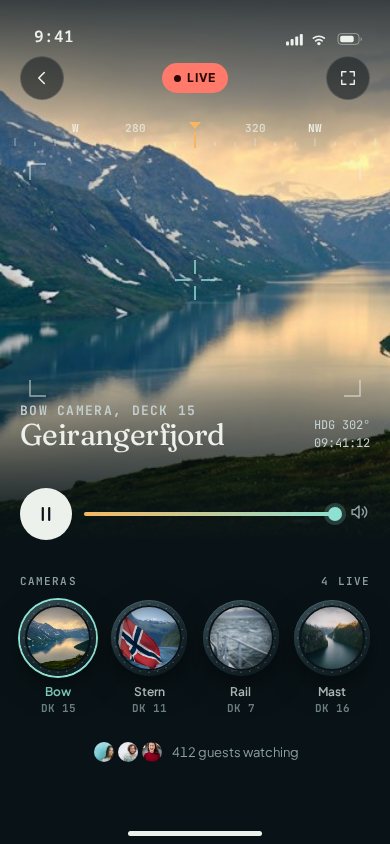
Fjord is a complete cruise companion: welcome, sign in with a booking reference, the safety drill, a today screen with the port, all aboard time and the day's plan, the itinerary on a nautical chart, port days, shore excursions with booking and a confirmation, a day planner, dining with a table reservation, a deck plan, the live voyage tracker, a bow camera, the onboard account, room service, Wi-Fi plans, the cabin, the cruise card, notifications, profile and settings. Fjord night slate with glacier mint and midnight sun amber.
| Detail | Value |
|---|---|
| Screen type | Media |
| App | Fjord: Cruise companion on board |
| Category | Travel |
| Design language | Dark-first, dark |
| Type | Fraunces for headings, Plus Jakarta Sans for text |
| Colours | #091317 background, #111e23 surface, #edf1ec text, #8b9ea3 text-muted, #8ee0d1 accent, #062a26 accent-contrast, #f5b862 secondary, #1f3138 border, #ff7a6b danger |
What this screen says
- LIVE
- Bow camera, Deck 15
- Geirangerfjord
- HDG 302°
- Cameras
- 4 live
- BowDK 15
- SternDK 11
- RailDK 7
- MastDK 16
- 412 guests watching
Around it in Fjord
More player, camera and editor screens
- Permit Scan passport: Visas and travel documents wallet
- Backroad Postcard: Road trip planner with stops
- Piazza Audio guide: Self-guided city walking tours
- Museo Audio guide: Museum guide
- Spoke Scan: Bike sharing
- Omnia Scan to pay: Super app for rides, food and payments
- Staya Photo tour: Homes and stays from local hosts
- Lodge Photos: Hotels, deals and reservations
- Rove Photos: Reviews and things to do
- Ignition Check in: Car rental from local hosts
- Contrail Entertainment: Airline booking, check-in and boarding
- Keycard Digital key: Hotel stays, digital key and room service
What makes a good media player screen
- Content takes the space. Artwork, video or the camera view should fill most of the screen.
- Primary controls in the thumb zone. Play and pause, the shutter or the main tool, large and low on the screen.
- Show progress and position. A scrubber with elapsed and remaining time, or the step in a lesson.
- Hide secondary controls until needed. Lyrics, queue, filters and advanced tools can live behind a tap or a swipe.
The full media player screen guide and every example
Remix Fjord free: describe your own app and it is drawn in this design. Or get its files from $10: Figma, React Native, SwiftUI, Flutter and HTML.