Templates · Settings screens · Fitness app · Rise
Rise Settings screen
A settings screen from Rise, an alarm clock and sleep cycles app template in a Glass style. Screen 25 of 25.
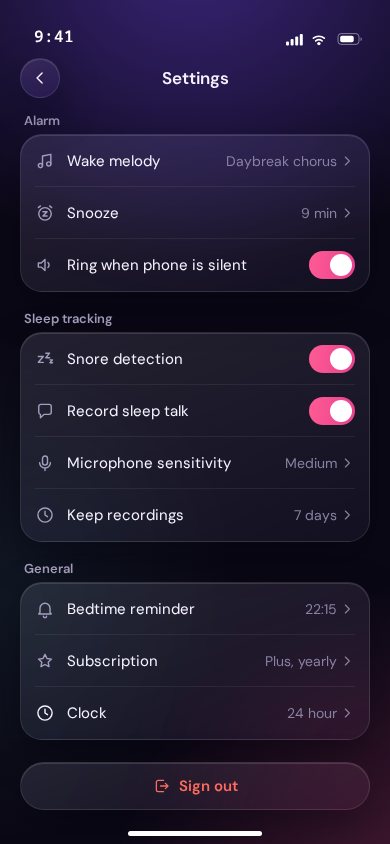
Rise is a complete smart alarm and sleep tracker: welcome, how it works, sign in, a tonight home with the horizon dial, alarms, set alarm with a wake window, wake melodies, bedtime notes, a live tracking night screen, the alarm ringing at sunrise, wake mood, a morning report, the night's sleep graph, snore and sleep talk recordings with a player, a journal, trends, how sleep notes change your nights, snoring, sleep aids with a player, a Plus plan, notifications, profile and settings. Aubergine glass with a rose to gold dawn and aqua.
| Detail | Value |
|---|---|
| Screen type | Settings |
| App | Rise: Alarm clock and sleep cycles |
| Category | Health and fitness |
| Design language | Glass, dark |
| Type | Unbounded for headings, DM Sans for text |
| Colours | #0b0816 background, #1b1430 surface, #f6f2ff text, #a59dbd text-muted, #ff4f87 accent, #ffffff accent-contrast, #58e3d4 secondary, #ffd166 highlight, #2a2240 border, #ff6b5e danger |
What this screen says
- Settings
- Alarm
- Wake melody
- Daybreak chorus
- Snooze
- 9 min
- Ring when phone is silent
- Sleep tracking
- Snore detection
- Record sleep talk
- Microphone sensitivity
- Medium
- Keep recordings
- 7 days
- General
- Bedtime reminder
- Subscription
- Plus, yearly
- Clock
- 24 hour
- Sign out
Around it in Rise
More settings screens
- Cradle Settings: Baby tracker
- Donor Settings: Blood donation, counted drop by drop
- Unfold Settings: Yoga and stretching
- Kilo Settings: Strength training log
- Cyra Reminders: Cycle tracker
- Harbor Settings: Therapy and mood
- Fasten Settings: Intermittent fasting
- Plate Settings: Calorie and macro tracker
- Vita Settings: Personal health record
- Forge Settings: AI fitness and nutrition
- Lull Settings: Sleep sounds and meditation
- Pace Settings: Fitness tracker
Every fitness app settings screen
What makes a good settings screen
- Group options into clear sections. Account, notifications, privacy, appearance and help, with headings, so people scan to the right group.
- Label settings by their effect. "Daily reminder at 8:00" is clearer than "Reminders". Add a short description under options that need one.
- Use the right control. Toggles for on and off, a row that opens a list for choices, and sliders only for ranges.
- Apply changes immediately. Most mobile settings take effect when changed, with no Save button to forget.
The full settings screen guide and every example
Remix Rise free: describe your own app and it is drawn in this design. Or get its files from $10: Figma, React Native, SwiftUI, Flutter and HTML.