Templates · Home screens · Food app · Corked
Corked Home screen
A home screen from Corked, a wine journal and cellar app template in a Luxury style. Screen 5 of 25.
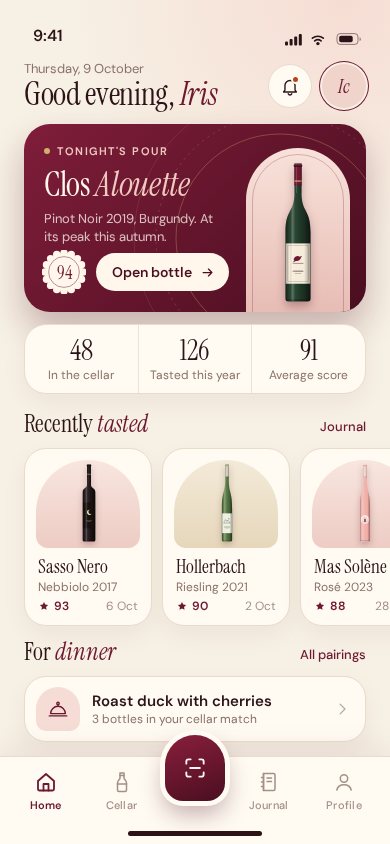
Corked is a complete wine journal: welcome, a palate quiz, sign in, a home with tonight's pour, scanning a label and its match, the bottle page, a tasting note with an aroma wheel, the journal, a cellar with a rack view, adding a bottle, food pairings, a wishlist, a shop with cart and delivery tracking, yearly stats, a Reserve membership, notifications, profile and settings. Every bottle and label is drawn for the template.
| Detail | Value |
|---|---|
| Screen type | Home |
| App | Corked: Wine journal and cellar |
| Category | Food |
| Design language | Luxury, light |
| Type | DM Sans |
| Colours | #f7f0e4 background, #fffaf2 surface, #2b1318 text, #8a7269 text-muted, #6d1730 accent, #fff6ec accent-contrast, #f0d3cb secondary, #e8dccb border, #b8431f danger |
What this screen says
- Thursday, 9 October
- Good evening, Iris
- Ic
- Tonight's pour
- Clos Alouette
- Pinot Noir 2019, Burgundy. At its peak this autumn.
- Open bottle
- 48In the cellar
- 126Tasted this year
- 91Average score
- Recently tasted
- Journal
- Sasso Nero
- Nebbiolo 2017
- 936 Oct
- Hollerbach
- Riesling 2021
- 902 Oct
- Mas Solène
- Rosé 2023
- 8828 Sep
- For dinner
- All pairings
- Roast duck with cherries
- 3 bottles in your cellar match
- Home
- Cellar
- Profile
Around it in Corked
More home screens
- Tabla Home: Tables worth dressing for
- Crumb Home: Neighbourhood bakery
- Tiffin Home: Food delivery
- Courier Home: Food delivery driver app
- Picker Batches: Grocery shopper app
- Queue Home: Join the waitlist from anywhere
- Nosh Home: Local restaurant reviews
- Buns Home: Burger chain ordering and deals
- Slice Home: Pizza ordering with a live tracker
- Crate Home: Meal kits delivered weekly
- Dash Home: Ten minute grocery delivery
- Aisle Lists: Shared grocery lists
What makes a good home screen
- Put the most important thing first. Decide the one thing most people come for, like today's workout, a balance or the next booking, and give it the top of the screen.
- Make it feel current. Greetings with the time of day, today's date, fresh numbers and recent activity tell people the app is alive and about them.
- Keep quick actions within thumb reach. The two or three things people do most should be one tap away, in the lower part of the screen or a floating button.
- Group related content in clear sections. Use headings and spacing so the screen scans as a few blocks, not a long mixed list.
The full home screen guide and every example
Remix Corked free: describe your own app and it is drawn in this design. Or get its files from $10: Figma, React Native, SwiftUI, Flutter and HTML.