Templates · Player, camera and editor screens · Sports app · Pitwall
Pitwall Team radio screen
A media screen from Pitwall, a race engineering app template in a Dark-first style. Screen 7 of 24.
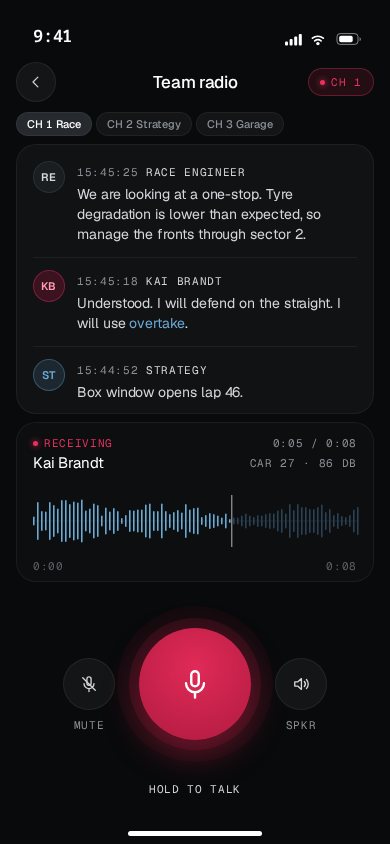
Pitwall is a complete race engineering app on carbon black: onboarding, sign in, a mission control home, a live track map, timing, driver and team radio, strategy and pit stops, a digital twin of the car with tyres, powertrain, brakes and telemetry, system logs and alerts, and a car development lab with simulations and design variables. Crimson for what matters, steel blue for reference data, mono labels throughout.
| Detail | Value |
|---|---|
| Screen type | Media |
| App | Pitwall: Race engineering |
| Category | Sports |
| Design language | Dark-first, dark |
| Type | Geist Mono for headings, Geist for text |
| Colours | #080a0b background, #101214 surface, #ffffff text, #8b9096 text-muted, #c41f48 accent, #ffffff accent-contrast, #6ca9d4 secondary, #1d2023 border, #ff4d6d danger |
What this screen says
- Team radio
- CH 1
- CH 1 Race CH 2 Strategy CH 3 Garage
- RE
- 15:45:25 Race engineer
- We are looking at a one-stop. Tyre degradation is lower than expected, so manage the fronts through sector 2.
- KB
- 15:45:18 Kai Brandt
- Understood. I will defend on the straight. I will use overtake .
- ST
- 15:44:52 Strategy
- Box window opens lap 46.
- Receiving 0:05 / 0:08
- Kai Brandt Car 27 · 86 dB
- Mute
- Spkr
- Hold to talk
Around it in Pitwall
More player, camera and editor screens
- Frag Live match: Esports tournaments and teams
- Canter Video review: Riding stables and lessons
- Ollie Clip: Skate spots and clips
- Oche Throw clinic: Darts scorer and leagues
- Crag Hangboard: Climbing gym logbook
- Swell Live cam: Surf forecast
- Scoreboard Highlight: Scores and news for every sport
- Bib Certificate: Find and enter races
- Wicket Highlights: Live cricket scores
- Courtside Highlights: Pickup basketball games
- Harbor Video session: Therapy and mood
- Plate Scan barcode: Calorie and macro tracker
What makes a good media player screen
- Content takes the space. Artwork, video or the camera view should fill most of the screen.
- Primary controls in the thumb zone. Play and pause, the shutter or the main tool, large and low on the screen.
- Show progress and position. A scrubber with elapsed and remaining time, or the step in a lesson.
- Hide secondary controls until needed. Lyrics, queue, filters and advanced tools can live behind a tap or a swipe.
The full media player screen guide and every example
Remix Pitwall free: describe your own app and it is drawn in this design. Or get its files from $10: Figma, React Native, SwiftUI, Flutter and HTML.