Templates · Player, camera and editor screens · Fitness app · Harbor
Harbor Video session screen
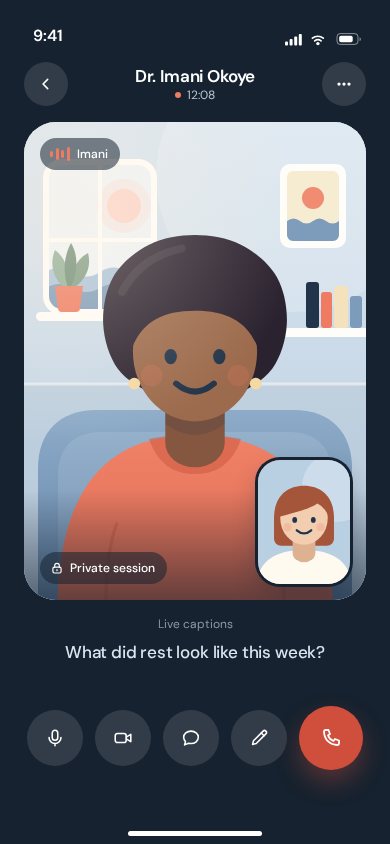
A media screen from Harbor, a therapy and mood app template in a Minimal style. Screen 18 of 25.
Harbor is a complete therapy and mood app: welcome, sign in, a passcode and first goals, a home that asks how you are, a two step mood check in, a journal with entries and prompts, mood trends with what lifts and weighs on you, therapist matching, a therapist page, booking and a video session, calming exercises with a breathing timer, crisis help, a Plus plan, notifications, profile and settings. Everything is drawn: five mood blobs with faces, soft portraits and a small boat in a harbour.
| Detail | Value |
|---|---|
| Screen type | Media |
| App | Harbor: Therapy and mood |
| Category | Health and fitness |
| Design language | Minimal, light |
| Type | DM Sans |
| Colours | #f4eee3 background, #fffdf9 surface, #22344a text, #7f8c99 text-muted, #55789c accent, #ffffff accent-contrast, #ee7b62 secondary, #e8dfd0 border, #cf4f3c danger |
What this screen says
- Dr. Imani Okoye
- Imani
- Private session
- Live captions
- What did rest look like this week?
Around it in Harbor
More player, camera and editor screens
- Mend Guided: Physio and rehab exercises
- Tabata Exercise: HIIT interval timer
- Jab Class video: Boxing workouts with a smart bag
- Exhale HRV check: Breathwork sessions
- Bump Scan: Pregnancy week by week
- Morsel Scan: AI calorie tracker
- Dew Camera: AI skin scan and routine
- Medly Video visit: Doctor on call
- Unfold Player: Yoga and stretching
- Plate Scan barcode: Calorie and macro tracker
- Vita Scan a report: Personal health record
- Forge Scan food: AI fitness and nutrition
Every fitness app media screen
What makes a good media player screen
- Content takes the space. Artwork, video or the camera view should fill most of the screen.
- Primary controls in the thumb zone. Play and pause, the shutter or the main tool, large and low on the screen.
- Show progress and position. A scrubber with elapsed and remaining time, or the step in a lesson.
- Hide secondary controls until needed. Lyrics, queue, filters and advanced tools can live behind a tap or a swipe.
The full media player screen guide and every example
Remix Harbor free: describe your own app and it is drawn in this design. Or get its files from $10: Figma, React Native, SwiftUI, Flutter and HTML.