Templates · Player, camera and editor screens · Sports app · Swell
Swell Live cam screen
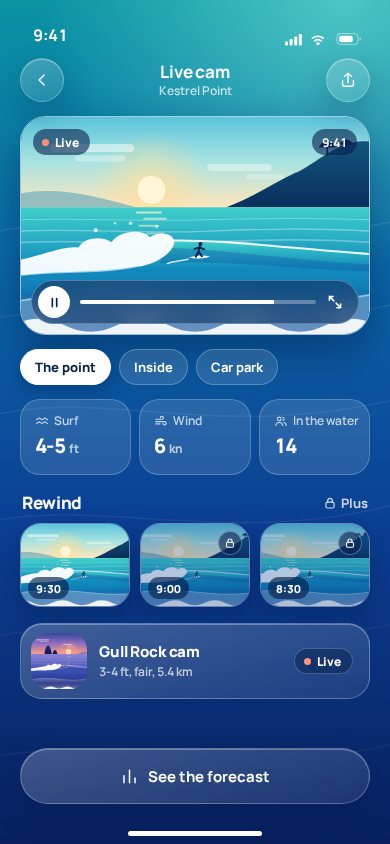
A media screen from Swell, a surf forecast app template in a Glass style. Screen 12 of 25.
Swell is a complete surf forecast app: welcome, sign in and a home break picker, a spot home with today's rating, hourly surf bars, a week outlook, a tide curve, a wind compass, swell trains and a live cam, a spots map with a spot guide, a sessions log with season stats, swell alerts, notifications, a Plus plan, profile and settings. Everything sits on one teal to deep blue water gradient with frosted cards and foam white for whatever is selected.
| Detail | Value |
|---|---|
| Screen type | Media |
| App | Swell: Surf forecast |
| Category | Sports |
| Design language | Glass, dark |
| Type | Manrope |
| Colours | #0b4a97 background, #3f79b6 surface, #ffffff text, #c3dcee text-muted, #ffffff accent, #06204d accent-contrast, #7ff5dc secondary, #6f9fd0 border, #ff8f7a danger |
What this screen says
- Live cam
- Kestrel Point
- Live9:41
- The point Inside Car park
- Surf
- 4-5 ft
- Wind
- 6 kn
- In the water
- Rewind
- Plus
- Gull Rock cam
- 3-4 ft, fair, 5.4 km
- Live
- See the forecast
Around it in Swell
More player, camera and editor screens
- Scoreboard Highlight: Scores and news for every sport
- Bib Certificate: Find and enter races
- Wicket Highlights: Live cricket scores
- Courtside Highlights: Pickup basketball games
- Frag Live match: Esports tournaments and teams
- Canter Video review: Riding stables and lessons
- Ollie Clip: Skate spots and clips
- Oche Throw clinic: Darts scorer and leagues
- Crag Hangboard: Climbing gym logbook
- Pitwall Team radio: Race engineering
- Dusk Camera: Smart home scenarios
- Lumen Speaker: Smart home energy
What makes a good media player screen
- Content takes the space. Artwork, video or the camera view should fill most of the screen.
- Primary controls in the thumb zone. Play and pause, the shutter or the main tool, large and low on the screen.
- Show progress and position. A scrubber with elapsed and remaining time, or the step in a lesson.
- Hide secondary controls until needed. Lyrics, queue, filters and advanced tools can live behind a tap or a swipe.
The full media player screen guide and every example
Remix Swell free: describe your own app and it is drawn in this design. Or get its files from $10: Figma, React Native, SwiftUI, Flutter and HTML.