Templates · Home screens · Social app · Parrot
Parrot Chats screen
A home screen from Parrot, a social app template in a Minimal style. Screen 5 of 25.
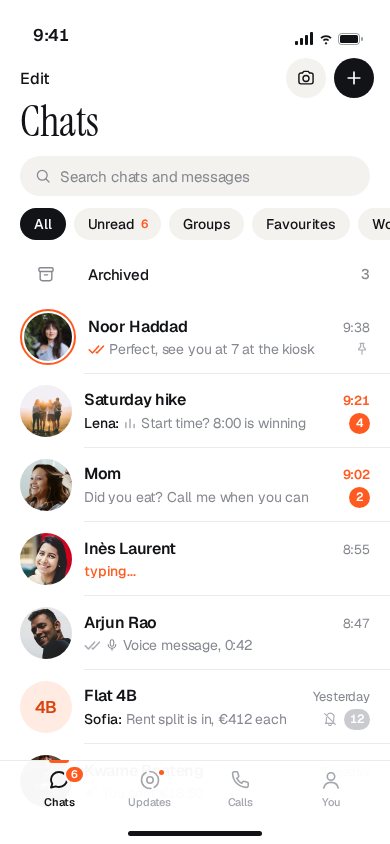
Parrot is a complete everyday messenger: welcome, phone number and code, profile setup, a chat list with filters, pinned and archived chats, a one to one chat with photos, a voice note and replies, a group chat with a poll, contact and group info, a new chat picker, a new group, search across messages, shared media, the camera, live location, voice and video calls, a call log, status updates and a story, sending money in a chat with a receipt, a Plus plan, storage and data, and settings. White and paper grey with ink and a single vermilion accent.
| Detail | Value |
|---|---|
| Screen type | Home |
| App | Parrot: Private messaging, groups and calls |
| Category | Social |
| Design language | Minimal, light |
| Type | Instrument Serif for headings, Geist for text |
| Colours | #ffffff background, #f3f2ee surface, #121316 text, #85888f text-muted, #ff5a1f accent, #ffffff accent-contrast, #121316 secondary, #ecebe7 border, #e5352b danger |
What this screen says
- Edit
- Chats
- Search chats and messages
- All Unread6 Groups Favourites Work
- Archived3
- Noor Haddad
- Perfect, see you at 7 at the kiosk
- Saturday hike
- Lena: Start time? 8:00 is winning
- Mom
- Did you eat? Call me when you can
- Inès Laurent
- typing...
- Arjun Rao
- Voice message, 0:42
- 4B
- Flat 4B
- Yesterday
- Sofia: Rent split is in, €412 each
- Kwame Boateng
- Tuesday
- You sent €18.50
- 6Chats
- Updates
- Calls
- You
Around it in Parrot
More home screens
- Hearth Chats: Messenger for trips and circles
- Chirp Chats: Messenger with file sharing
- Banter Chats: Live messenger
- Natter Chats: Minimal messenger
- Nearly Home: Dating by crossed paths
- Linkup Home: Professional network and jobs
- Quorum Home: Questions and expert answers
- Backer Home: Support creators with memberships
- Pledge Discover: Back creative projects
- Civic Home: Report issues and city services
- Guild Home: Community servers with voice and text chat
- Carrier Chats: Cloud messaging with channels
What makes a good home screen
- Put the most important thing first. Decide the one thing most people come for, like today's workout, a balance or the next booking, and give it the top of the screen.
- Make it feel current. Greetings with the time of day, today's date, fresh numbers and recent activity tell people the app is alive and about them.
- Keep quick actions within thumb reach. The two or three things people do most should be one tap away, in the lower part of the screen or a floating button.
- Group related content in clear sections. Use headings and spacing so the screen scans as a few blocks, not a long mixed list.
The full home screen guide and every example
Remix Parrot free: describe your own app and it is drawn in this design. Or get its files from $10: Figma, React Native, SwiftUI, Flutter and HTML.