Templates · Home screens · Social app · Linkup
Linkup Home screen
A home screen from Linkup, a professional network and jobs app template in an Enterprise style. Screen 4 of 25.
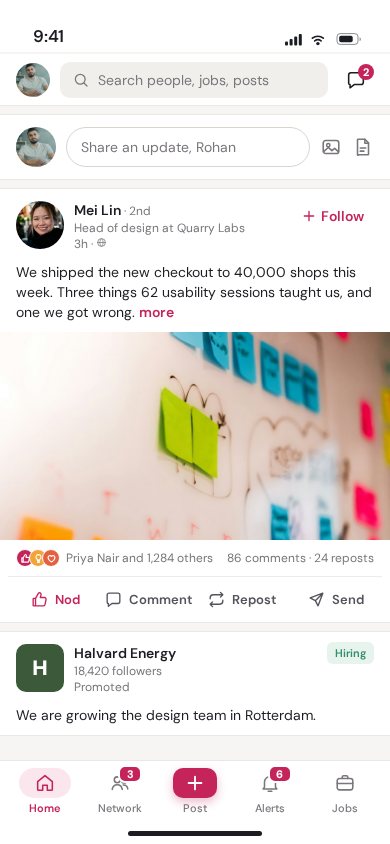
Linkup is a complete professional network: welcome, goals and sign in, a home feed of posts with reactions, a post with its comments, writing a post, your profile with experience, another member's profile, skills with endorsements, my network with invitations, people search, jobs with recommendations and filtered results, a job with a quick apply flow, review and confirmation, an applications tracker, messages and a conversation, notifications, who viewed your profile, a company page, a Pro plan and settings. Warm white and graphite with a single raspberry.
| Detail | Value |
|---|---|
| Screen type | Home |
| App | Linkup: Professional network and jobs |
| Category | Social |
| Design language | Enterprise, light |
| Type | Bricolage Grotesque for headings, DM Sans for text |
| Colours | #f6f5f3 background, #ffffff surface, #1c1d22 text, #7a767c text-muted, #c4245a accent, #fbe6ee accent-tint, #1c1d22 secondary, #f0a43a highlight, #ebe7e3 border, #2f8f6a success |
What this screen says
- Search people, jobs, posts
- Share an update, Rohan
- Mei Lin · 2nd Head of design at Quarry Labs 3h ·
- Follow
- We shipped the new checkout to 40,000 shops this week. Three things 62 usability sessions taught us, and one we got...
- Priya Nair and 1,284 others 86 comments · 24 reposts
- Nod
- Comment
- Repost
- Send
- Hiring
- Halvard Energy18,420 followers Promoted
- We are growing the design team in Rotterdam.
- Home
- 3Network
- Post
- 6Alerts
- Jobs
Around it in Linkup
More home screens
- Wink Home: Video first dating
- Snoot Home: Social app for pets
- Huddle Home: Interest groups and meetups
- Glade Home: Photo and clip social network
- Onair Home: Live streaming
- Drift Home: Reels and voice rooms
- Glitz Discover: Party live streaming
- Hearth Chats: Messenger for trips and circles
- Chirp Chats: Messenger with file sharing
- Banter Chats: Live messenger
- Natter Chats: Minimal messenger
- Nearly Home: Dating by crossed paths
What makes a good home screen
- Put the most important thing first. Decide the one thing most people come for, like today's workout, a balance or the next booking, and give it the top of the screen.
- Make it feel current. Greetings with the time of day, today's date, fresh numbers and recent activity tell people the app is alive and about them.
- Keep quick actions within thumb reach. The two or three things people do most should be one tap away, in the lower part of the screen or a floating button.
- Group related content in clear sections. Use headings and spacing so the screen scans as a few blocks, not a long mixed list.
The full home screen guide and every example
Remix Linkup free: describe your own app and it is drawn in this design. Or get its files from $10: Figma, React Native, SwiftUI, Flutter and HTML.