Templates · Home screens · Social app · Carrier
Carrier Chats screen
A home screen from Carrier, a cloud messaging with channels app template in a Glass style. Screen 4 of 25.
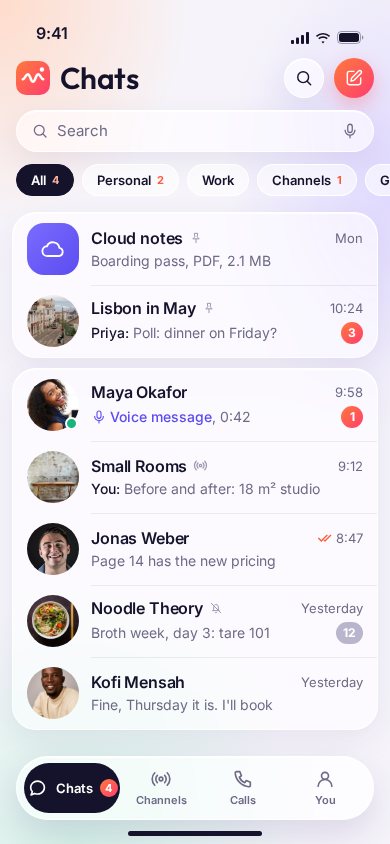
Carrier is a complete cloud messenger: welcome, phone number and code, a chat list with folders and pinned chats, a conversation with photos, a voice note and a reply, a group with a poll, a contact profile, a photo viewer, channels you follow, a channel feed with views and reactions, channel info, discover and search, creating a channel, writing and scheduling a post, channel stats, calls with voice and video, cloud storage, the Plus plan with checkout, activity, your profile and settings. Pearl glass with persimmon, rose and ink.
| Detail | Value |
|---|---|
| Screen type | Home |
| App | Carrier: Cloud messaging with channels |
| Category | Social |
| Design language | Glass, light |
| Type | Outfit for headings, Inter for text |
| Colours | #f6f4fa background, #ffffff surface, #15132b text, #6e6a86 text-muted, #ff5a3c accent, #ffffff accent-contrast, #5b4cf0 secondary, #e7e4f0 border, #ff3b5c danger |
What this screen says
- Chats
- Search
- All 4 Personal 2 Work Channels 1 Groups
- Cloud notes Mon
- Boarding pass, PDF, 2.1 MB
- Lisbon in May 10:24
- Priya: Poll: dinner on Friday?
- Maya Okafor9:58
- Voice message, 0:42
- Small Rooms 9:12
- You: Before and after: 18 m² studio
- Jonas Weber 8:47
- Page 14 has the new pricing
- Noodle Theory Yesterday
- Broth week, day 3: tare 101
- Kofi MensahYesterday
- Fine, Thursday it is. I'll book
- Chats 4
- Channels
- Calls
- You
Around it in Carrier
More home screens
- Huddle Home: Interest groups and meetups
- Glade Home: Photo and clip social network
- Onair Home: Live streaming
- Drift Home: Reels and voice rooms
- Glitz Discover: Party live streaming
- Hearth Chats: Messenger for trips and circles
- Chirp Chats: Messenger with file sharing
- Banter Chats: Live messenger
- Natter Chats: Minimal messenger
- Nearly Home: Dating by crossed paths
- Linkup Home: Professional network and jobs
- Quorum Home: Questions and expert answers
What makes a good home screen
- Put the most important thing first. Decide the one thing most people come for, like today's workout, a balance or the next booking, and give it the top of the screen.
- Make it feel current. Greetings with the time of day, today's date, fresh numbers and recent activity tell people the app is alive and about them.
- Keep quick actions within thumb reach. The two or three things people do most should be one tap away, in the lower part of the screen or a floating button.
- Group related content in clear sections. Use headings and spacing so the screen scans as a few blocks, not a long mixed list.
The full home screen guide and every example
Remix Carrier free: describe your own app and it is drawn in this design. Or get its files from $10: Figma, React Native, SwiftUI, Flutter and HTML.