Templates · Form and input screens · Smart home app · Nursery
Nursery Log sleep screen
A form screen from Nursery, a baby monitor camera and sleep app template in a Glass style. Screen 14 of 25.
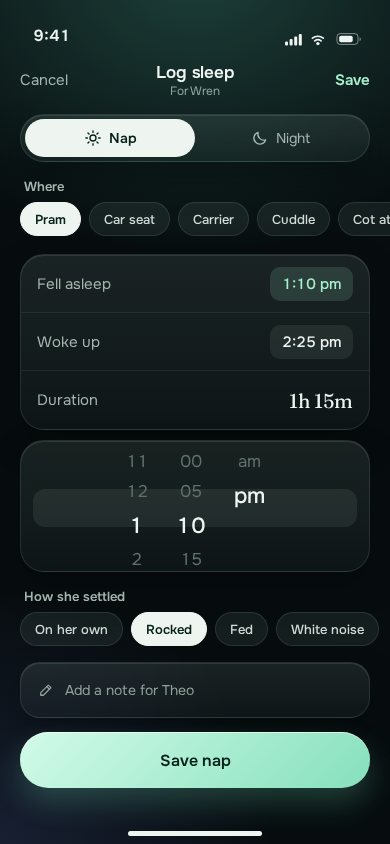
Nursery is a complete baby monitor and sleep app: welcome, pairing the camera, sign in, a home with the live crib view, breathing and the room, a full screen night vision live view with talk back and lullabies, a live breathing band, room temperature and humidity, the night's events and clips, last night's sleep band, weekly trends, a sleep log, auto saved moments, a sleep coach, alert settings, notifications, caregivers with an invite flow, a Plus plan with checkout, the baby's profile and settings. Midnight moss glass with mint, honey and lavender.
| Detail | Value |
|---|---|
| Screen type | Form |
| App | Nursery: Baby monitor camera and sleep |
| Category | Smart home |
| Design language | Glass, dark |
| Type | Fraunces for headings, Onest for text |
| Colours | #070d0f background, #13201f surface (glass: white at 3.5 to 9.5% over the page), #eef5f1 text, #8fa39b text-muted, #a6f0cf accent, #06201a accent-contrast, #ffcf8a secondary, #bdb7ff tertiary, #ff9d8c danger |
What this screen says
- Cancel
- Log sleepFor Wren
- Save
- Nap
- Night
- Where
- Pram Car seat Carrier Cuddle Cot at Gran's
- Fell asleep 1:10 pm
- Woke up 2:25 pm
- Duration 1h 15m
- am pm
- How she settled
- On her own Rocked Fed White noise
- Add a note for Theo
- Save nap
Around it in Nursery
More form and input screens
- Chime New routine: Voice assistant and smart speaker
- Latch New key: Smart locks and guest access
- Mesh Schedule: Home Wi-Fi network
- Decibel Group rooms: Multi-room speakers
- Porch Motion zones: Home security cameras
- Sundial Battery mode: Solar panels and home battery
- Puddle Edit schedule: Garden watering and sprinklers
- Upkeep Log task: Home maintenance calendar
- Kelvin Edit period: Climate and thermostat
- Glow Colour: Light scenes and colour
- Tagged Your policy: Home inventory for insurance
- Lobby New guest pass: Apartment building app
Every smart home app form screen
What makes a good form screen
- Ask only what you need. Every field is a reason to stop. Remove optional fields or move them to later.
- Labels above fields. Visible labels stay readable while people type; placeholder-only labels disappear.
- Use the right keyboard and input. Number pads for amounts, email keyboards for email, pickers for dates and autofill for addresses and codes.
- Validate as people go. Show problems next to the field when people leave it, in words that say how to fix them.
The full form screen guide and every example
Remix Nursery free: describe your own app and it is drawn in this design. Or get its files from $10: Figma, React Native, SwiftUI, Flutter and HTML.