Templates · Form and input screens · Smart home app · Latch
Latch New key screen
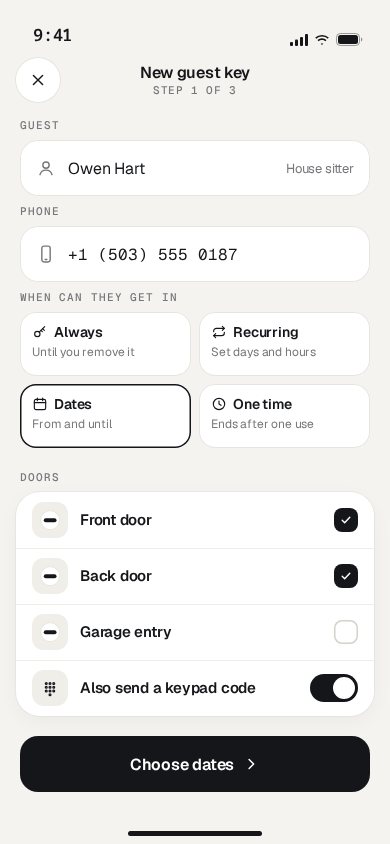
A form screen from Latch, a smart locks and guest access app template in a Minimal style. Screen 12 of 25.
Latch is a complete smart lock app: welcome, sign in, a home with a big lock dial, door details, a live auto-lock countdown, every door across two homes, a door activity log with entry details, guest keys with schedules, an access window picker, review and a sent key, keypad codes with a number pad, auto-lock and auto-unlock, lock health insights, adding and calibrating a lock, a plan, notifications, account and settings. Porcelain and white with ink, one vermilion for unlocked and a calm green for locked.
| Detail | Value |
|---|---|
| Screen type | Form |
| App | Latch: Smart locks and guest access |
| Category | Smart home |
| Design language | Minimal, light |
| Type | Geist Mono for headings, Geist for text |
| Colours | #f4f3ef background, #ffffff surface, #141619 text, #76777b text-muted, #ff5a28 accent, #ffebe3 accent-soft, #1d9a66 success, #d98a00 warning, #e7e5df border |
What this screen says
- New guest keyStep 1 of 3
- Guest
- Owen HartHouse sitter
- Phone
- +1 (503) 555 0187
- When can they get in
- Always
- Until you remove it
- Recurring
- Set days and hours
- Dates
- From and until
- One time
- Ends after one use
- Doors
- Front door
- Back door
- Garage entry
- Also send a keypad code
- Choose dates
Around it in Latch
More form and input screens
- Dusk New scenario: Smart home scenarios
- Lumen Add device: Smart home energy
- Abode Set a time: Smart home devices
- Boxed Move details: Book movers and plan moving day
- Meter Confirm reading: Your energy supplier account
- Couch Keyboard: TV remote, casting and watchlist
- Chime New routine: Voice assistant and smart speaker
- Mesh Schedule: Home Wi-Fi network
- Decibel Group rooms: Multi-room speakers
- Nursery Log sleep: Baby monitor camera and sleep
- Porch Motion zones: Home security cameras
- Sundial Battery mode: Solar panels and home battery
Every smart home app form screen
What makes a good form screen
- Ask only what you need. Every field is a reason to stop. Remove optional fields or move them to later.
- Labels above fields. Visible labels stay readable while people type; placeholder-only labels disappear.
- Use the right keyboard and input. Number pads for amounts, email keyboards for email, pickers for dates and autofill for addresses and codes.
- Validate as people go. Show problems next to the field when people leave it, in words that say how to fix them.
The full form screen guide and every example
Remix Latch free: describe your own app and it is drawn in this design. Or get its files from $10: Figma, React Native, SwiftUI, Flutter and HTML.