Templates · Form and input screens · Smart home app · Mesh
Mesh Schedule screen
A form screen from Mesh, a home Wi-Fi network app template in a Glass style. Screen 12 of 25.
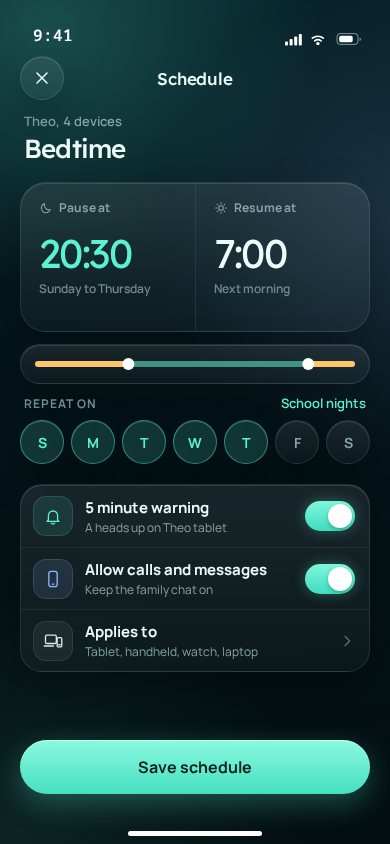
Mesh is a complete home Wi-Fi app: welcome, sign in and a code, a home with network health, a live topology map, node details, every connected device with usage, search, family profiles with pause and bedtime schedules, a guest network to share, a live speed test with history, security and ad blocking, adding a node with placement guidance, notifications, a Shield plan with checkout, account and settings. Deep petrol glass with aqua and ice blue.
| Detail | Value |
|---|---|
| Screen type | Form |
| App | Mesh: Home Wi-Fi network |
| Category | Smart home |
| Design language | Glass, dark |
| Type | Lexend for headings, Manrope for text |
| Colours | #041419 background, #12282e surface, #eefcf9 text, #86a3a6 text-muted, #5cf2cf accent, #03211c accent-contrast, #8fb6ff secondary, #22393e border, #ff7a85 danger |
What this screen says
- Schedule
- Theo, 4 devices
- Bedtime
- Pause at
- Sunday to Thursday
- Resume at
- Next morning
- Repeat on
- School nights
- 5 minute warning
- A heads up on Theo tablet
- Allow calls and messages
- Keep the family chat on
- Applies to
- Tablet, handheld, watch, laptop
- Save schedule
Around it in Mesh
More form and input screens
- Abode Set a time: Smart home devices
- Boxed Move details: Book movers and plan moving day
- Meter Confirm reading: Your energy supplier account
- Couch Keyboard: TV remote, casting and watchlist
- Chime New routine: Voice assistant and smart speaker
- Latch New key: Smart locks and guest access
- Decibel Group rooms: Multi-room speakers
- Nursery Log sleep: Baby monitor camera and sleep
- Porch Motion zones: Home security cameras
- Sundial Battery mode: Solar panels and home battery
- Puddle Edit schedule: Garden watering and sprinklers
- Upkeep Log task: Home maintenance calendar
Every smart home app form screen
What makes a good form screen
- Ask only what you need. Every field is a reason to stop. Remove optional fields or move them to later.
- Labels above fields. Visible labels stay readable while people type; placeholder-only labels disappear.
- Use the right keyboard and input. Number pads for amounts, email keyboards for email, pickers for dates and autofill for addresses and codes.
- Validate as people go. Show problems next to the field when people leave it, in words that say how to fix them.
The full form screen guide and every example
Remix Mesh free: describe your own app and it is drawn in this design. Or get its files from $10: Figma, React Native, SwiftUI, Flutter and HTML.