Templates · Form and input screens · Smart home app · Puddle
Puddle Edit schedule screen
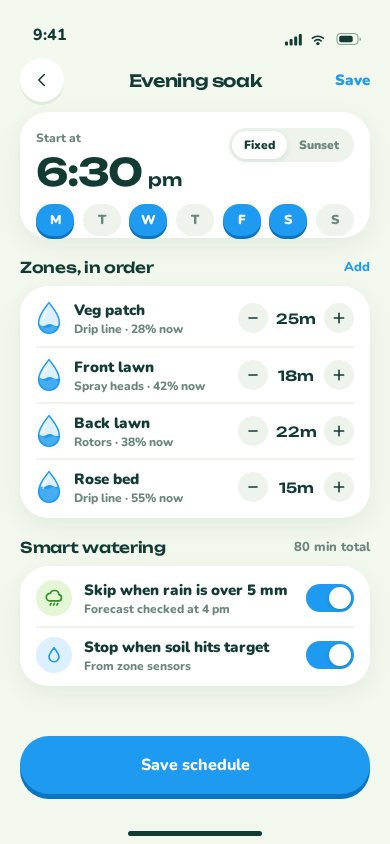
A form screen from Puddle, a garden watering and sprinklers app template in a Playful style. Screen 10 of 25.
Puddle is a complete smart sprinkler and garden watering app: welcome, pairing the controller, sign in, a garden home with every zone as a droplet gauge, zones and a zone page with soil moisture, a live watering run, a done screen, schedules and a schedule editor, adding a zone, a rain skip weather forecast, water usage, a plant library and plant care page, a drawn garden map, a camera plant check, a shop with a product, basket and order placed, notifications, a Plus plan, profile and settings. Sprout green and white with pond blue water, leaf green, sun yellow and clay.
| Detail | Value |
|---|---|
| Screen type | Form |
| App | Puddle: Garden watering and sprinklers |
| Category | Smart home |
| Design language | Playful, light |
| Type | Unbounded for headings, Nunito for text |
| Colours | #f3f8ee background, #ffffff surface, #123b34 text, #6b867d text-muted, #1e9bf0 accent, #ffffff accent-contrast, #5cc23a secondary, #e1eadc border, #f0784a danger |
What this screen says
- Evening soak
- Save
- Start at
- 6:30pm
- Fixed Sunset
- MTWTFSS
- Zones, in orderAdd
- Veg patchDrip line · 28% now
- 25m
- Front lawnSpray heads · 42% now
- 18m
- Back lawnRotors · 38% now
- 22m
- Rose bedDrip line · 55% now
- 15m
- Smart watering80 min total
- Skip when rain is over 5 mmForecast checked at 4 pm
- Stop when soil hits targetFrom zone sensors
- Save schedule
Around it in Puddle
More form and input screens
- Dusk New scenario: Smart home scenarios
- Lumen Add device: Smart home energy
- Abode Set a time: Smart home devices
- Boxed Move details: Book movers and plan moving day
- Meter Confirm reading: Your energy supplier account
- Couch Keyboard: TV remote, casting and watchlist
- Chime New routine: Voice assistant and smart speaker
- Latch New key: Smart locks and guest access
- Mesh Schedule: Home Wi-Fi network
- Decibel Group rooms: Multi-room speakers
- Nursery Log sleep: Baby monitor camera and sleep
- Porch Motion zones: Home security cameras
Every smart home app form screen
What makes a good form screen
- Ask only what you need. Every field is a reason to stop. Remove optional fields or move them to later.
- Labels above fields. Visible labels stay readable while people type; placeholder-only labels disappear.
- Use the right keyboard and input. Number pads for amounts, email keyboards for email, pickers for dates and autofill for addresses and codes.
- Validate as people go. Show problems next to the field when people leave it, in words that say how to fix them.
The full form screen guide and every example
Remix Puddle free: describe your own app and it is drawn in this design. Or get its files from $10: Figma, React Native, SwiftUI, Flutter and HTML.