Templates · Form and input screens · Smart home app · Lobby
Lobby New guest pass screen
A form screen from Lobby, an apartment building app template in an Enterprise style. Screen 8 of 25.
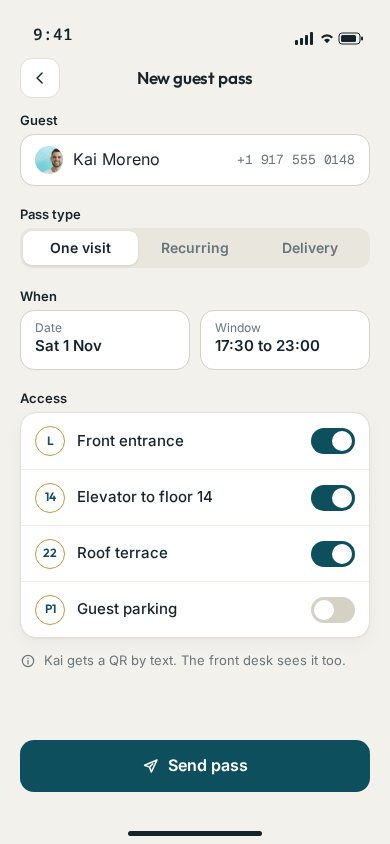
Lobby is a complete resident app for a 22 floor apartment building: welcome, sign in with a building invite, a home with your unit on a brass elevator dial, a phone door key, packages with locker codes, guest passes with a QR, amenity search, a rooftop booking with time slots and confirmation, maintenance requests with a live timeline, building notices, elevator and service status, laundry machines, a community board, utility usage, notifications, a concierge plan, profile and settings. Limestone and white with deep petrol teal and brass.
| Detail | Value |
|---|---|
| Screen type | Form |
| App | Lobby: Apartment building app |
| Category | Smart home |
| Design language | Enterprise, light |
| Type | Outfit for headings, Inter for text |
| Colours | #f3f1ec background, #ffffff surface, #15232a text, #68767b text-muted, #0d4f5c accent, #ffffff accent-contrast, #c4983f secondary, #e3dfd5 border, #b8392f danger |
What this screen says
- New guest pass
- Guest
- Kai Moreno +1 917 555 0148
- Pass type
- One visit Recurring Delivery
- When
- DateSat 1 Nov
- Window17:30 to 23:00
- Access
- L Front entrance
- 14 Elevator to floor 14
- 22 Roof terrace
- P1 Guest parking
- Kai gets a QR by text. The front desk sees it too.
- Send pass
Around it in Lobby
More form and input screens
- Boxed Move details: Book movers and plan moving day
- Meter Confirm reading: Your energy supplier account
- Couch Keyboard: TV remote, casting and watchlist
- Chime New routine: Voice assistant and smart speaker
- Latch New key: Smart locks and guest access
- Mesh Schedule: Home Wi-Fi network
- Decibel Group rooms: Multi-room speakers
- Nursery Log sleep: Baby monitor camera and sleep
- Porch Motion zones: Home security cameras
- Sundial Battery mode: Solar panels and home battery
- Puddle Edit schedule: Garden watering and sprinklers
- Upkeep Log task: Home maintenance calendar
Every smart home app form screen
What makes a good form screen
- Ask only what you need. Every field is a reason to stop. Remove optional fields or move them to later.
- Labels above fields. Visible labels stay readable while people type; placeholder-only labels disappear.
- Use the right keyboard and input. Number pads for amounts, email keyboards for email, pickers for dates and autofill for addresses and codes.
- Validate as people go. Show problems next to the field when people leave it, in words that say how to fix them.
The full form screen guide and every example
Remix Lobby free: describe your own app and it is drawn in this design. Or get its files from $10: Figma, React Native, SwiftUI, Flutter and HTML.