Templates · Home screens · Food app · Nibs
Nibs Home screen
A home screen from Nibs, a food allergy and label scanner app template in a Clinical style. Screen 4 of 25.
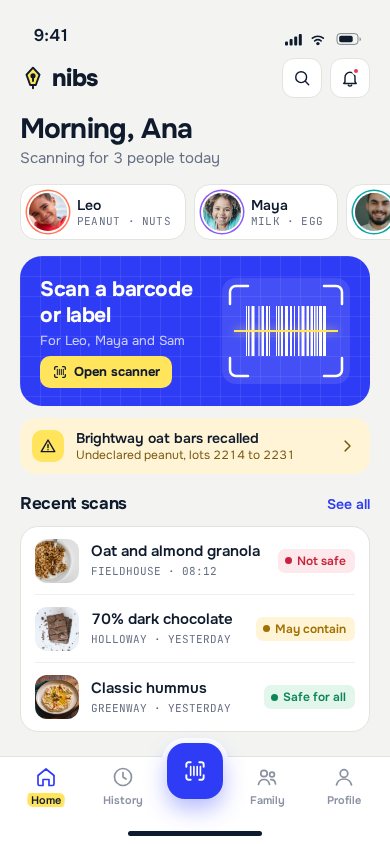
Nibs is a complete allergy scanner for a whole family: welcome, allergen setup and sign in, a home that scans for everyone at once, a live barcode and label scanner, a verdict with the ingredient list highlighted word by word, ingredient explainers, safe swaps and product pages, search, history, family profiles with emergency plans, a translated chef card for restaurants, a reaction log, insights, recalls, a safe groceries basket and order, a family plan, notifications, profile and settings. Paper white and ink navy with cobalt and three highlighter inks.
| Detail | Value |
|---|---|
| Screen type | Home |
| App | Nibs: Food allergy and label scanner |
| Category | Food |
| Design language | Clinical, light |
| Type | JetBrains Mono for headings, Onest for text |
| Colours | #f3f4f1 background, #ffffff surface, #0f1b2d text, #677083 text-muted, #2f3cf5 accent, #ffffff accent-contrast, #ffe45c secondary, #e2e4de border, #e8384f danger |
What this screen says
- nibs
- Morning, Ana
- Scanning for 3 people today
- LeoPEANUT · NUTS
- MayaMILK · EGG
- SamGLUTEN
- Scan a barcode or label
- For Leo, Maya and Sam
- Open scanner
- Brightway oat bars recalledUndeclared peanut, lots 2214 to 2231
- Recent scans
- See all
- Oat and almond granolaFIELDHOUSE · 08:12
- Not safe
- 70% dark chocolateHOLLOWAY · YESTERDAY
- May contain
- Classic hummusGREENWAY · YESTERDAY
- Safe for all
- Home
- History
- Family
- Profile
Around it in Nibs
More home screens
- Brigade Service: Restaurant kitchen and line ops
- Ladle Home: Recipes and meal planning
- Pantry Home: Grocery delivery
- Brewly Home: Coffee ordering and loyalty
- Tabla Home: Tables worth dressing for
- Corked Home: Wine journal and cellar
- Crumb Home: Neighbourhood bakery
- Tiffin Home: Food delivery
- Courier Home: Food delivery driver app
- Picker Batches: Grocery shopper app
- Queue Home: Join the waitlist from anywhere
- Nosh Home: Local restaurant reviews
What makes a good home screen
- Put the most important thing first. Decide the one thing most people come for, like today's workout, a balance or the next booking, and give it the top of the screen.
- Make it feel current. Greetings with the time of day, today's date, fresh numbers and recent activity tell people the app is alive and about them.
- Keep quick actions within thumb reach. The two or three things people do most should be one tap away, in the lower part of the screen or a floating button.
- Group related content in clear sections. Use headings and spacing so the screen scans as a few blocks, not a long mixed list.
The full home screen guide and every example
Remix Nibs free: describe your own app and it is drawn in this design. Or get its files from $10: Figma, React Native, SwiftUI, Flutter and HTML.