Templates · Onboarding screens · Social app · Nearly
Nearly Location screen
An onboarding screen from Nearly, a dating by crossed paths app template in a Glass style. Screen 7 of 25.
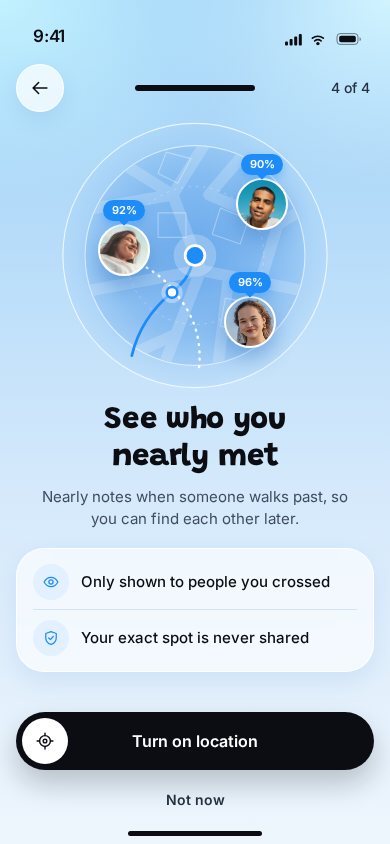
Nearly is a complete dating app built around the people you walk past: onboarding, sign in, profile setup, a home deck of big portrait cards with match scores, a radar map of who is nearby, explore and filters, a profile with every place you crossed, likes, a match moment, chats, date planning, hotspots, insights, a membership paywall, profile and settings. Sky blue and frosted glass with a playful headline font.
| Detail | Value |
|---|---|
| Screen type | Onboarding |
| App | Nearly: Dating by crossed paths |
| Category | Social |
| Design language | Glass, light |
| Type | Inter |
| Colours | #e6f3ff background, #ffffff surface, #0b0d12 text, #66758c text-muted, #1d8cf8 accent, #ffffff accent-contrast, #0b0d12 secondary, #d6e6f7 border, #ff4d6a danger |
What this screen says
- 4 of 4
- See who you
- nearly met
- Nearly notes when someone walks past, so you can find each other later.
- Only shown to people you crossed
- Your exact spot is never shared
- Turn on location
- Not now
Around it in Nearly
More onboarding screens
- Soapbox Welcome: Weekly debates and polls
- Ballot Welcome: Settle it on paper
- Murmur Welcome: Chat rooms for art lovers
- Wink Welcome: Video first dating
- Snoot Welcome: Social app for pets
- Huddle Welcome: Interest groups and meetups
- Glade Welcome: Photo and clip social network
- Onair Welcome: Live streaming
- Drift Welcome: Reels and voice rooms
- Glitz Welcome: Party live streaming
- Hearth Welcome: Messenger for trips and circles
- Chirp Welcome: Messenger with file sharing
Every social app onboarding screen
What makes a good onboarding screen
- One idea per screen. Each screen should say one thing in a headline people can read in a second. If a screen needs a paragraph, it is doing too much.
- Personalise with a purpose. Ask a question only if the answer changes what people see next, like a goal, a level or an interest. Then show that the answer mattered.
- Explain permissions before asking. Show your own screen saying why you need notifications, location or the camera before the system prompt. People who understand the reason are more likely to allow it.
- Let people skip. A visible skip or "I'll do this later" respects returning users and the impatient. Make sure skipping still lands them somewhere useful.
The full onboarding screen guide and every example
Remix Nearly free: describe your own app and it is drawn in this design. Or get its files from $10: Figma, React Native, SwiftUI, Flutter and HTML.